<?xml version="1.0" encoding="utf-8"?><feed xmlns="http://www.w3.org/2005/Atom" ><generator uri="https://jekyllrb.com/" version="3.10.0">Jekyll</generator><link href="https://superhotdogcat.github.io/feed.xml" rel="self" type="application/atom+xml" /><link href="https://superhotdogcat.github.io/" rel="alternate" type="text/html" /><updated>2026-10-31T22:22:16+09:00</updated><id>https://superhotdogcat.github.io/feed.xml</id><title type="html">SuperHotDogCat’s Blog</title><subtitle>SuperHotDogCat&apos;s Portfolio &amp; Blog</subtitle><author><name>SuperHotDogCat</name></author><entry xml:lang="en"><title type="html">HPC Laws and Finer-Grained Modeling</title><link href="https://superhotdogcat.github.io/blog/2026/10/31/hpcformulas/" rel="alternate" type="text/html" title="HPC Laws and Finer-Grained Modeling" /><published>2026-10-31T00:00:00+09:00</published><updated>2026-10-31T00:00:00+09:00</updated><id>https://superhotdogcat.github.io/blog/2026/10/31/hpcformulas</id><content type="html" xml:base="https://superhotdogcat.github.io/blog/2026/10/31/hpcformulas/"><![CDATA[<p>This post is part of <a href="/blog/2026/10/12/planning/">my series on High Performance Computing</a>.</p>

<h1 id="what-this-post-covers">What this post covers</h1>
<p>In <a href="/blog/2026/10/25/modelingestimation/">the previous post</a>, I showed how to estimate the performance ceiling of a whole system, and in <a href="/blog/2026/10/19/howtoseecatalogspec/">the post before that</a>, how to compare the performance of a single kernel against catalog specs. This time I’ll cover two smaller topics that didn’t fit into those posts.</p>

<ol>
  <li><strong>Amdahl’s law</strong> and <strong>Gustafson’s law</strong>, which describe how much faster a program gets when you parallelize it, and the matching notions of <strong>strong scaling</strong> and <strong>weak scaling</strong></li>
  <li>How to compute <strong>peak performance</strong> yourself from the hardware configuration, instead of just taking the catalog spec value as I’ve done so far</li>
</ol>

<h1 id="hardware-specs">Hardware specs</h1>

<table>
  <thead>
    <tr>
      <th>Item</th>
      <th>Value</th>
    </tr>
  </thead>
  <tbody>
    <tr>
      <td>Machine</td>
      <td>NVIDIA GH200</td>
    </tr>
    <tr>
      <td>CPU</td>
      <td>NVIDIA Grace (Arm Neoverse V2, 72 cores)</td>
    </tr>
    <tr>
      <td>GPU</td>
      <td>NVIDIA H100 (132 SMs)</td>
    </tr>
    <tr>
      <td>CPU FP32 FLOPS</td>
      <td>7.1 TFLOPS (calculated, see below)</td>
    </tr>
    <tr>
      <td>CUDA FP32 FLOPS</td>
      <td>67 TFLOPS</td>
    </tr>
    <tr>
      <td>Tensor Core TF32 FLOPS</td>
      <td>494 TFLOPS</td>
    </tr>
    <tr>
      <td>Tensor Core BF16 FLOPS</td>
      <td>989 TFLOPS</td>
    </tr>
  </tbody>
</table>

<h1 id="amdahls-law-and-gustafsons-law">Amdahl’s law and Gustafson’s law</h1>
<p>If you go from 1 GPU to 8, does your program get 8 times faster? Usually not, because every program has parts that can’t be parallelized. Amdahl’s law and Gustafson’s law describe how much those parts hold you back. The two are often presented as opposing views, but they really just <strong>fix different things when measuring speedup</strong>, so they answer different questions <a href="#ref-amdahl-wiki">[1]</a> <a href="#ref-gustafson-wiki">[2]</a>.</p>

<h2 id="amdahls-law-fix-the-problem-size">Amdahl’s law: fix the problem size</h2>
<p>Amdahl’s law <a href="#ref-amdahl">[3]</a> considers the speedup when you <strong>keep the problem size (the total amount of work) fixed</strong> and increase the number of processors $N$. Let the execution time on 1 processor be 1, the fraction that can be parallelized be $p$, and the fraction that can’t be $1 - p$. On $N$ processors only the parallel part shrinks to $1/N$, so the execution time is $(1-p) + p/N$ and the speedup is</p>

\[S_{\text{Amdahl}}(N) = \frac{1}{(1 - p) + \frac{p}{N}}\]

<p>Even as $N \to \infty$, it levels off at</p>

\[S_{\text{Amdahl}}(\infty) = \frac{1}{1 - p}\]
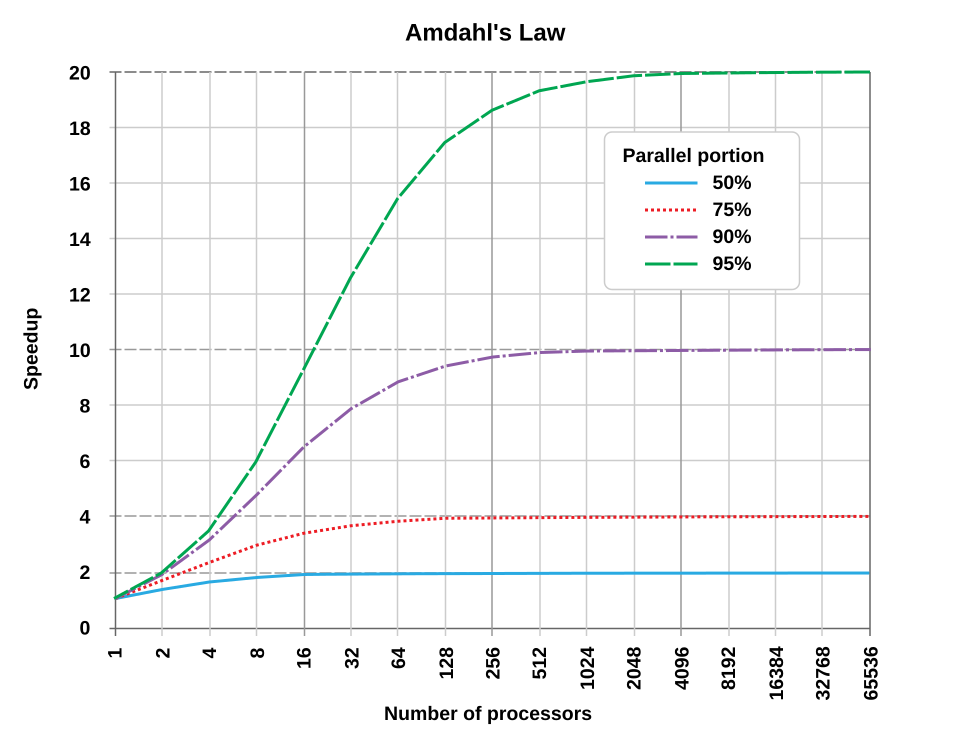
<p><img src="/assets/1031/AmdahlsLaw.png" alt="" />
Image from <a href="#ref-amdahl-fig">Wikimedia Commons [7]</a> (Daniels220, CC BY-SA 3.0)</p>

<p>The figure plots speedup against the number of processors for several parallel fractions $p$. Note that the x-axis is logarithmic. Even with $p = 0.95$ (95% parallelizable), the speedup is at most 20x. With $N = 8$ it’s $1 / (0.05 + 0.95/8) \approx 5.9$x, a parallel efficiency $S/N$ of 74%. Because the total work is fixed, the parallel part keeps shrinking as $N$ grows, while the serial part doesn’t, so the serial part takes up a larger and larger share. That’s the heart of this law.</p>

<h2 id="gustafsons-law-fix-the-execution-time">Gustafson’s law: fix the execution time</h2>
<p>Gustafson’s law <a href="#ref-gustafson">[4]</a>, on the other hand, <strong>fixes the execution time</strong> and grows the problem size along with the number of processors $N$. In practice, when you get more processors, you usually want to solve a bigger problem (a finer mesh, a bigger model, more requests) in the same time, rather than solve the same problem faster.</p>

<p>This time, let the execution time <strong>on $N$ processors</strong> be 1, with a serial fraction $s$ and a parallel fraction $1 - s$. Doing that parallel work on 1 processor would take $N$ times as long, so the same amount of work would take $s + (1 - s)N$ on 1 processor. The speedup is therefore</p>

\[S_{\text{Gustafson}}(N) = s + (1 - s)N = N - s(N - 1)\]

<p>and it keeps growing in proportion to $N$. With $s = 0.05$ and $N = 8$, it’s $8 - 0.05 \times 7 = 7.65$x.</p>

<p><img src="/assets/1031/Gustafson.png" alt="" />
Image from <a href="#ref-gustafson-fig">Wikimedia Commons [8]</a> (Peahihawaii, CC BY-SA 3.0)</p>

<p>The $a$ in the figure is the serial fraction $s$. Unlike the Amdahl figure, the x-axis here is linear, and for every $s$ the speedup grows in a straight line without leveling off.</p>

<h2 id="what-is-held-fixed">What is held fixed?</h2>
<p>The difference between the two formulas comes down to where you measure the serial fraction.</p>

<table>
  <thead>
    <tr>
      <th>Law</th>
      <th>What’s fixed</th>
      <th>Where the fraction is measured</th>
      <th>Speedup as $N \to \infty$</th>
    </tr>
  </thead>
  <tbody>
    <tr>
      <td>Amdahl</td>
      <td>Problem size (total work)</td>
      <td>Parallel fraction $p$ of the run time on 1 processor</td>
      <td>Levels off at $1/(1-p)$</td>
    </tr>
    <tr>
      <td>Gustafson</td>
      <td>Execution time (= work per processor)</td>
      <td>Serial fraction $s$ of the run time on $N$ processors</td>
      <td>Grows in proportion to $N$</td>
    </tr>
  </tbody>
</table>

<p>In Gustafson’s setting the problem size grows with $N$, so if you imagine running it on 1 processor, the serial fraction keeps getting smaller. You can also put it this way: the $p$ you plug into Amdahl’s formula approaches 1 as $N$ grows. Neither law is “the right one”. Which formula you use depends on whether <strong>you want to solve the same problem faster, or a bigger problem in the same time</strong>.</p>

<h2 id="strong-scaling-and-weak-scaling">Strong scaling and weak scaling</h2>
<p>The ways of measuring that correspond to these two laws are strong scaling and weak scaling. Whenever a paper or benchmark claims scalability, always check which one it measured.</p>

<p><strong>Strong scaling</strong> fixes the total problem size and increases the number of processors. This is Amdahl’s world. Ideally the execution time drops to $1/N$, and the parallel efficiency is</p>

\[E_{\text{strong}}(N) = \frac{T(1)}{N \cdot T(N)}\]

<p>In LLM serving terms, it’s the situation where you take decode for the same batch, split it from 1 GPU across 8 with tensor parallelism, and want each step to take less time. In <a href="/blog/2026/10/25/modelingestimation/">the previous post</a>, when I estimated that running a 1T-parameter dense model on 21 machines gives 21x the bandwidth, I was assuming ideal strong scaling.</p>

<p><strong>Weak scaling</strong> fixes the problem size per processor and increases the number of processors. This is Gustafson’s world. Ideally the execution time stays constant, and the parallel efficiency is</p>

\[E_{\text{weak}}(N) = \frac{T(1)}{T(N)}\]

<p>Here $T(N)$ is the time to solve an $N$-times-larger problem on $N$ processors. Training with data parallelism at a fixed per-GPU batch size, or serving requests with an independent replica on each GPU, falls into this category.</p>

<p>In general, weak scaling gives better-looking numbers, and strong scaling is harder. In strong scaling, the work per processor shrinks as $N$ grows, so fixed costs like the ones we saw in <a href="/blog/2026/10/19/howtoseecatalogspec/">the post before last</a> (kernel launches and so on) and the communication discussed next take up a larger share.</p>

<h2 id="a-finer-model-that-includes-communication">A finer model that includes communication</h2>
<p>Amdahl’s law only considers a serial part and a parallel part, but real parallel programs also pay for <strong>communication</strong>, and that cost changes with $N$. So let’s write the execution time as</p>

\[T(N) = T_{\text{serial}} + \frac{T_{\text{parallel}}}{N} + T_{\text{comm}}(N)\]

<p>For example, tensor-parallel decode needs an all-reduce in every layer. With a ring all-reduce, each GPU transfers $2D(N-1)/N$ for data of size $D$, which barely goes down as $N$ grows. On top of that comes latency proportional to the number of all-reduce steps. So while $T_{\text{parallel}}/N$ shrinks as $N$ grows, $T_{\text{comm}}(N)$ stays flat or grows, which means $T(N)$ hits a minimum somewhere, and adding more GPUs beyond that point actually makes things slower. For batch-size-1 decode, each layer only takes a few tens of µs of compute, so even an all-reduce of a few µs to a dozen or so µs quickly becomes significant.</p>

<p>Bounding things with Amdahl’s law and then adding terms for communication and fixed costs is the same style of modeling as the per-kernel build-up from the previous post.</p>

<h1 id="computing-peak-performance-yourself">Computing peak performance yourself</h1>
<p>In the earlier posts, I used peak performance numbers like 7.1 TFLOPS and 494 TFLOPS straight from the catalog specs. But where do those numbers come from? Instead of taking catalog numbers on faith, being able to compute them from the hardware configuration helps in situations like these:</p>

<ul>
  <li>When you want the performance for a precision (FP64, INT8, etc.) or an arithmetic unit that the catalog doesn’t list</li>
  <li>When you want the ceiling for a program that only uses 1 core or 1 SM (comparing the naive implementation against the 99.2 GFLOPS single-core peak in the post before last was exactly this)</li>
  <li>When the actual operating frequency differs from the catalog value</li>
  <li>When the catalog doesn’t list CPU peak performance at all, which is common (that’s what “calculated” meant in the tables in previous posts)</li>
</ul>

<p>The derivation below follows the slides of the University of Tokyo course “Parallel and Distributed Programming” <a href="#ref-taura">[5]</a>.</p>

<h2 id="cpu">CPU</h2>
<p>CPU peak performance is</p>

\[\text{peak performance} = \text{SIMD width} \times \text{instructions/cycle/core} \times \text{freq} \times \text{cores}\]

<p>In words: an instruction processes SIMD-width elements at once, a core can issue some number of these per cycle, there are some number of cycles per second, and there are some number of cores. Multiply them together. For FLOPS, the instruction that does the most arithmetic is the <strong>FMA (Fused Multiply Add)</strong>, $d = a \times b + c$, which is 2 FLOP per element (a multiply and an add). So</p>

\[\text{peak FLOPS} = (2 \times \text{SIMD width}) \times \text{FMA insts/cycle/core} \times \text{freq} \times \text{cores}\]

<p>GH200’s Grace uses Arm Neoverse V2 cores, each with four 128-bit SIMD pipelines, and each pipeline can issue an FMA every cycle. In FP32, 4 elements fit in 128 bits, so the SIMD width is 4. The frequencies are listed in the GH200 datasheet <a href="#ref-gh200">[6]</a>: <strong>base frequency 3.1 GHz, all-core SIMD frequency 3.0 GHz</strong>. Using the 3.1 GHz base frequency,</p>

\[\begin{aligned}
\text{1 core} &amp;= (2 \times 4) \times 4 \times 3.1\,\text{G} = 99.2\,\text{GFLOPS} \\
\text{72 cores} &amp;= 99.2\,\text{GFLOPS} \times 72 \approx 7.1\,\text{TFLOPS}
\end{aligned}\]

<p>and that’s where the 7.1 TFLOPS I’ve been using comes from. However, the frequency when all 72 cores keep running SIMD instructions is given as 3.0 GHz, so for a computation like matmul that saturates FMA on every core, the more accurate ceiling is</p>

\[(2 \times 4) \times 4 \times 3.0\,\text{G} \times 72 \approx 6.9\,\text{TFLOPS}\]

<p>That said, the difference is only about 3%, so the arguments in the earlier posts still hold. For a naive implementation using only 1 core, the ceiling of 99.2 GFLOPS at 3.1 GHz is fine as is. For FP64 the SIMD width is 2, so the numbers halve to 3.6 TFLOPS and 3.5 TFLOPS respectively.</p>

<p>The formula also tells you something. Code that only uses scalar FMA without SIMD instructions can reach at most $1/4$ of peak (in FP32). Code that issues multiplies and adds separately instead of using FMA can reach at most half. The naive implementation in the post before last reached only about 4% of single-core peak, and on top of the memory problem, factors like these stack up.</p>

<h2 id="gpu-cuda-core">GPU (CUDA Core)</h2>
<p>The same idea applies to GPUs. Instead of SIMD instructions, a GPU has a <strong>warp</strong> of 32 threads execute the same instruction together. So the warp width (32) plays the role of the SIMD width, and an SM plays the role of a core. (Really, this is no surprise, since SIMT (Single Instruction, Multiple Threads), the GPU’s execution model, is an extension of SIMD that lets you write each SIMD lane as a thread <a href="#ref-cuda-simt">[10]</a>.)</p>

\[\text{peak FLOPS} = (2 \times \text{warp width}) \times \text{warps/cycle/SM} \times \text{freq} \times \text{SMs}\]

<p>An H100 SM is split into 4 sub-partitions, and each can execute one warp’s worth (32 lanes) of FP32 FMA per cycle (this is why people say an SM has 128 FP32 cores). So warps/cycle/SM = 4, and there are 132 SMs.</p>

<p>Unlike the CPU’s, the GPU frequency isn’t in the GH200 datasheet <a href="#ref-gh200">[6]</a>, but the max boost clock of the GH200’s GPU is 1980 MHz <a href="#ref-gh200-wiki">[9]</a>. I checked on my own GH200 and got 1980 MHz as well.</p>

<div class="language-bash highlighter-rouge"><div class="highlight"><pre class="highlight"><code><span class="nv">$ </span>nvidia-smi <span class="nt">--query-gpu</span><span class="o">=</span>clocks.max.sm <span class="nt">--format</span><span class="o">=</span>csv
clocks.max.sm <span class="o">[</span>MHz]
1980 MHz
</code></pre></div></div>

<p>Using this,</p>

\[(2 \times 32) \times 4 \times 1.98\,\text{G} \times 132 \approx 66.9\,\text{TFLOPS}\]

<p>which gives the 67 TFLOPS in the spec table.</p>

<h2 id="gpu-tensor-core">GPU (Tensor Core)</h2>
<p>A Tensor Core is an arithmetic unit that computes a small matrix multiply in a single instruction. Each H100 Tensor Core can compute $C = A \times B + C$ once per cycle, with TF32 inputs $A$ ($4 \times 8$) and $B$ ($8 \times 8$) and FP32 $C$ <a href="#ref-taura">[5]</a>. Each of the $4 \times 8$ outputs is a length-8 dot product (8 FMAs), so the work per cycle is</p>

\[2 \times 4 \times 8 \times 8 = 512\,\text{FLOP/cycle}\]

<p>Each H100 SM has 4 Tensor Cores, so 132 SMs give $4 \times 132 = 528$ Tensor Cores. At the same 1.98 GHz,</p>

\[512\,[\text{FLOP/cycle}] \times 1.98\,\text{G}\,[\text{cycle/s}] \times 528\,[\text{Tensor Cores}] \approx 535.3\,\text{TFLOPS}\]

<p>Per SM, CUDA Cores do 256 FLOP/cycle while Tensor Cores do $512 \times 4 = 2048$ FLOP/cycle, 8 times as much. That’s why using Tensor Cores is fast.</p>

<p>Going to lower precision, the number of elements processed per cycle grows in inverse proportion to the precision, giving 1070.5 TFLOPS for FP16/BF16 and 2141.1 TFLOPS for FP8 (all dense). Every value computed here is for dense matmul. Catalogs sometimes list values using 2:4 structured sparsity alongside, and those are twice the dense values, so watch out.</p>

<h2 id="the-formula-predicts-quite-accurately">The formula predicts quite accurately</h2>
<p>Let’s put these results next to the values in the datasheet <a href="#ref-gh200">[6]</a>.</p>

<table>
  <thead>
    <tr>
      <th>Unit</th>
      <th>Formula (1.98 GHz)</th>
      <th>Datasheet</th>
      <th>Datasheet / Formula</th>
    </tr>
  </thead>
  <tbody>
    <tr>
      <td>CUDA Core FP32</td>
      <td>66.9 TFLOPS</td>
      <td>67 TFLOPS</td>
      <td>1.00</td>
    </tr>
    <tr>
      <td>Tensor Core TF32</td>
      <td>535.3 TFLOPS</td>
      <td>494 TFLOPS</td>
      <td>0.92</td>
    </tr>
    <tr>
      <td>Tensor Core BF16</td>
      <td>1070.5 TFLOPS</td>
      <td>990 TFLOPS</td>
      <td>0.92</td>
    </tr>
    <tr>
      <td>Tensor Core FP8</td>
      <td>2141.1 TFLOPS</td>
      <td>1,979 TFLOPS</td>
      <td>0.92</td>
    </tr>
  </tbody>
</table>

<p>For CUDA Cores, the formula gives exactly the datasheet value. For Tensor Cores, the datasheet is about 8% lower, but the thing to notice is that the ratio is <strong>0.92 for TF32, BF16 and FP8 alike</strong>. The only term in the formula that changes with precision is the work per cycle, so a constant ratio means the gap doesn’t come from there. It comes from a term shared by all precisions: the frequency. NVIDIA doesn’t state the reason, but presumably it’s because high-power workloads that saturate the Tensor Cores can’t sustain the max boost clock, so the Tensor Core numbers are quoted at a lower frequency.</p>

<p>So peak performance can be predicted quite accurately as the product of a few factors: SIMD width, instructions per cycle, frequency, and core count. And when a prediction is off, you can narrow down which factor is off.</p>

<p>This is useful because when measured performance falls short of the theoretical FLOPS, <strong>you can break it down and analyze which factor is missing</strong>. If all you have is the catalog number of 494 TFLOPS, you can’t say anything beyond “I’m only getting 80%”. But once you break it into the formula, you can split the problem into hypotheses you can check one at a time:</p>

<ul>
  <li>Frequency: is the clock dropping during the measurement?</li>
  <li>SIMD width: are SIMD or Tensor Core instructions actually being used (or has it fallen back to scalar instructions or CUDA Cores)?</li>
  <li>Instructions per cycle: is it using FMA, and is it issuing an instruction every cycle?</li>
  <li>Core count: is work being assigned to every core or SM?</li>
</ul>

<p>In the next section, I’ll go into frequency, which is the easiest of these to overlook.</p>

<h2 id="frequency-isnt-constant">Frequency isn’t constant</h2>
<p>Just as the Tensor Core datasheet values were lower than the values computed at the max boost clock, on the CPU side the Grace datasheet lists an all-core SIMD frequency (3.0 GHz) separately from the base frequency (3.1 GHz). That’s because keeping the SIMD units busy on every core makes the frequency drop due to power limits.</p>

<p>Both GPUs and CPUs change their operating frequency dynamically depending on power and temperature. There’s no guarantee they actually run at the frequency in the datasheet or spec table.</p>

<p>In other words, frequency is the most uncertain term in the theoretical peak formula. When you run experiments, it’s worth checking the actual frequency.</p>

<div class="language-bash highlighter-rouge"><div class="highlight"><pre class="highlight"><code><span class="c"># GPU: current clock and max clock</span>
nvidia-smi <span class="nt">--query-gpu</span><span class="o">=</span>clocks.sm,clocks.max.sm <span class="nt">--format</span><span class="o">=</span>csv
<span class="c"># Watch how the clock changes during a measurement</span>
nvidia-smi dmon <span class="nt">-s</span> pc
<span class="c"># CPU</span>
lscpu | <span class="nb">grep</span> <span class="nt">-i</span> mhz
</code></pre></div></div>

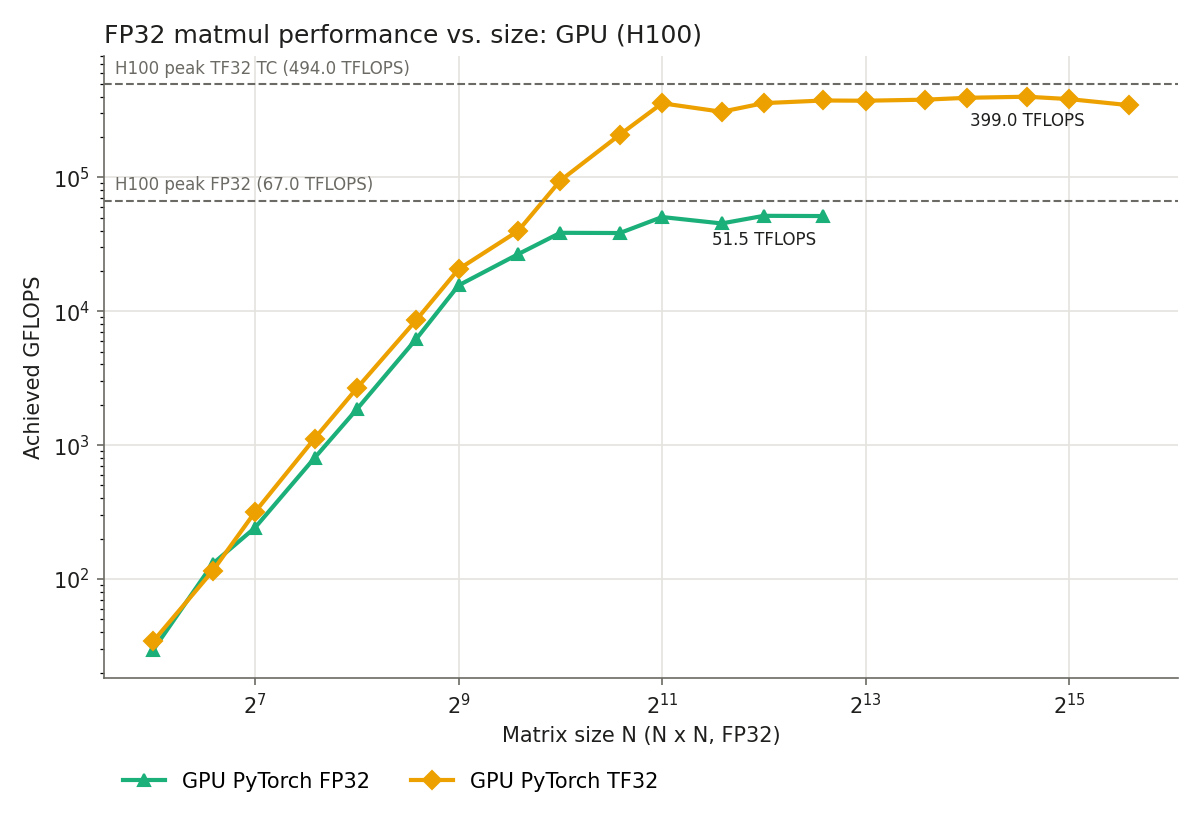
<p>If the clock drops to 1.6 GHz during a measurement, the Tensor Core TF32 ceiling is $512 \times 1.6\,\text{G} \times 528 \approx 433$ TFLOPS. In the post before last, PyTorch’s TF32 matmul reached 399 TFLOPS (81% of 494 TFLOPS), but compared against a ceiling recomputed at the actual frequency, the achieved fraction might be even higher. Conversely, if you don’t notice that the frequency has dropped, you may blame your implementation and keep hunting for headroom that doesn’t exist.</p>

<p>The catalog number of 494 TFLOPS alone can’t tell you “it was because the frequency dropped”. Estimating peak performance from the formula lets you dig into factors like frequency when you’re not reaching theoretical FLOPS, and that’s the main reason not to stop at the spec values.</p>

<h1 id="summary">Summary</h1>
<ul>
  <li>Amdahl’s law is the speedup when <strong>the problem size is fixed</strong>. It levels off at $1/(1-p)$ because of the serial fraction $1-p$. It corresponds to strong scaling.</li>
  <li>Gustafson’s law is the speedup when <strong>the execution time (work per processor) is fixed</strong>. It grows in proportion to $N$. It corresponds to weak scaling.</li>
  <li>In real parallel programs, terms for communication and fixed costs change with $N$. Adding them to the model lets you estimate the point where adding GPUs stops helping.</li>
  <li>Peak performance can be computed as $(2 \times \text{SIMD width}) \times \text{FMA insts/cycle/core} \times \text{freq} \times \text{cores}$. For GPUs you swap in the warp width and SM count, and for Tensor Cores the matmul size per cycle. This formula reproduces the datasheet values quite accurately.</li>
  <li>Once you break it into the formula, you can analyze whether frequency, SIMD, FMA or core count is the cause when you’re not reaching theoretical FLOPS.</li>
  <li>Frequency is the term that varies the most. The H100 Tensor Core datasheet values are computed at a frequency below the max boost clock, and Grace has a separate frequency for SIMD. Check the actual clock during your measurements and compare against a ceiling based on it.</li>
</ul>

<h1 id="reference">Reference</h1>

<p><span id="ref-amdahl-wiki"></span>[1] Wikipedia, “Amdahl’s law”, <a href="https://en.wikipedia.org/wiki/Amdahl%27s_law">https://en.wikipedia.org/wiki/Amdahl%27s_law</a></p>

<p><span id="ref-gustafson-wiki"></span>[2] Wikipedia, “Gustafson’s law”, <a href="https://en.wikipedia.org/wiki/Gustafson%27s_law">https://en.wikipedia.org/wiki/Gustafson%27s_law</a></p>

<p><span id="ref-amdahl"></span>[3] G. M. Amdahl, “Validity of the single processor approach to achieving large scale computing capabilities”, AFIPS Spring Joint Computer Conference, 1967, <a href="https://doi.org/10.1145/1465482.1465560">https://doi.org/10.1145/1465482.1465560</a></p>

<p><span id="ref-gustafson"></span>[4] J. L. Gustafson, “Reevaluating Amdahl’s law”, Communications of the ACM, 1988, <a href="https://doi.org/10.1145/42411.42415">https://doi.org/10.1145/42411.42415</a></p>

<p><span id="ref-taura"></span>[5] K. Taura, Parallel and Distributed Programming, lecture slides “Introduction”, <a href="https://taura.github.io/parallel-distributed-programming/slides/intro.pdf">https://taura.github.io/parallel-distributed-programming/slides/intro.pdf</a></p>

<p><span id="ref-gh200"></span>[6] NVIDIA, “NVIDIA GH200 Grace Hopper Superchip Datasheet”, 2024, <a href="https://www.nvidia.com/en-us/data-center/grace-hopper-superchip/">https://www.nvidia.com/en-us/data-center/grace-hopper-superchip/</a></p>

<p><span id="ref-amdahl-fig"></span>[7] Daniels220, “AmdahlsLaw.svg”, Wikimedia Commons, CC BY-SA 3.0, <a href="https://commons.wikimedia.org/wiki/File:AmdahlsLaw.svg">https://commons.wikimedia.org/wiki/File:AmdahlsLaw.svg</a></p>

<p><span id="ref-gustafson-fig"></span>[8] Peahihawaii, “Gustafson.png”, Wikimedia Commons, CC BY-SA 3.0, <a href="https://commons.wikimedia.org/wiki/File:Gustafson.png">https://commons.wikimedia.org/wiki/File:Gustafson.png</a></p>

<p><span id="ref-gh200-wiki"></span>[9] Wikipedia, “Grace Hopper GH200”, <a href="https://en.wikipedia.org/wiki/Grace_Hopper_GH200">https://en.wikipedia.org/wiki/Grace_Hopper_GH200</a></p>

<p><span id="ref-cuda-simt"></span>[10] NVIDIA, “CUDA C++ Programming Guide (v12.4), 4.1 SIMT Architecture”, <a href="https://docs.nvidia.com/cuda/archive/12.4.0/cuda-c-programming-guide/index.html#simt-architecture">https://docs.nvidia.com/cuda/archive/12.4.0/cuda-c-programming-guide/index.html#simt-architecture</a></p>]]></content><author><name>SuperHotDogCat</name></author><category term="Tech" /><summary type="html"><![CDATA[Things I didn't get to cover in the last two posts]]></summary></entry><entry xml:lang="ja"><title type="html">HPCの法則とか細かいモデリングとか</title><link href="https://superhotdogcat.github.io/ja/blog/2026/10/31/hpcformulas/" rel="alternate" type="text/html" title="HPCの法則とか細かいモデリングとか" /><published>2026-10-31T00:00:00+09:00</published><updated>2026-10-31T00:00:00+09:00</updated><id>https://superhotdogcat.github.io/ja/blog/2026/10/31/hpcformulas</id><content type="html" xml:base="https://superhotdogcat.github.io/ja/blog/2026/10/31/hpcformulas/"><![CDATA[<p>これは<a href="/ja/blog/2026/10/12/planning/">High Performance Computingのシリーズ連載</a>の一部です。</p>

<h1 id="このブログで話すこと">このブログで話すこと</h1>
<p><a href="/ja/blog/2026/10/25/modelingestimation/">前回の記事</a>ではモデル全体の性能の上限を見積もる方法を, <a href="/ja/blog/2026/10/19/howtoseecatalogspec/">前々回の記事</a>では単一のカーネルの性能をカタログスペックと比べる方法を紹介しました。今回はその2回で紹介しきれなかった細かい話を2つ書きます。</p>

<ol>
  <li>並列化したときにどこまで速くなるかを表す<strong>アムダールの法則</strong>と<strong>グスタフソンの法則</strong>, そしてそれぞれに対応する<strong>強スケーリング</strong>と<strong>弱スケーリング</strong></li>
  <li>これまでカタログスペックの値をそのまま使っていた<strong>ピーク性能</strong>を, ハードウェアの構成から自分で計算する方法</li>
</ol>

<h1 id="ハードウェアのスペック">ハードウェアのスペック</h1>

<table>
  <thead>
    <tr>
      <th>項目</th>
      <th>値</th>
    </tr>
  </thead>
  <tbody>
    <tr>
      <td>Machine</td>
      <td>NVIDIA GH200</td>
    </tr>
    <tr>
      <td>CPU</td>
      <td>NVIDIA Grace (Arm Neoverse V2, 72 cores)</td>
    </tr>
    <tr>
      <td>GPU</td>
      <td>NVIDIA H100 (132 SMs)</td>
    </tr>
    <tr>
      <td>CPU FP32 FLOPS</td>
      <td>7.1 TFLOPS(計算値, 後述)</td>
    </tr>
    <tr>
      <td>CUDA FP32 FLOPS</td>
      <td>67 TFLOPS</td>
    </tr>
    <tr>
      <td>Tensor Core TF32 FLOPS</td>
      <td>494 TFLOPS</td>
    </tr>
    <tr>
      <td>Tensor Core BF16 FLOPS</td>
      <td>989 TFLOPS</td>
    </tr>
  </tbody>
</table>

<h1 id="アムダールの法則とグスタフソンの法則">アムダールの法則とグスタフソンの法則</h1>
<p>GPUを1枚から8枚に増やしたら8倍速くなるでしょうか?多くの場合なりません。プログラムには並列化できない部分があるからです。この「並列化できない部分がどれだけ足を引っ張るか」を表すのがアムダールの法則とグスタフソンの法則です。この2つはよく対立するものとして紹介されますが, 実際には<strong>何を固定して速度向上を測るか</strong>が違うだけで, 別の問いに答えています <a href="#ref-amdahl-wiki">[1]</a> <a href="#ref-gustafson-wiki">[2]</a>。</p>

<h2 id="アムダールの法則-問題サイズを固定する">アムダールの法則: 問題サイズを固定する</h2>
<p>アムダールの法則 <a href="#ref-amdahl">[3]</a> は, <strong>問題サイズ(全体の仕事量)を固定</strong>したまま, プロセッサ数 $N$ を増やしたときの速度向上を考えます。1プロセッサでの実行時間を1とし, そのうち並列化できる部分の割合を $p$, できない部分を $1 - p$ とします。$N$ プロセッサでは並列化できる部分だけが $1/N$ になるので, 実行時間は $(1-p) + p/N$ となり, 速度向上は</p>

\[S_{\text{Amdahl}}(N) = \frac{1}{(1 - p) + \frac{p}{N}}\]

<p>です。$N \to \infty$ としても</p>

\[S_{\text{Amdahl}}(\infty) = \frac{1}{1 - p}\]

<p>で頭打ちになります。</p>

<p><img src="/assets/1031/AmdahlsLaw.png" alt="" />
画像は<a href="#ref-amdahl-fig">Wikimedia Commons [7]</a>より取得 (Daniels220, CC BY-SA 3.0)</p>

<p>図は並列化可能な割合 $p$ ごとに, プロセッサ数と速度向上の関係を描いたものです。横軸が対数であることに注意してください。$p = 0.95$ (95%が並列化可能)でも, 速度向上は最大20倍です。$N = 8$ なら $1 / (0.05 + 0.95/8) \approx 5.9$ 倍で, 並列化効率 $S/N$ は74%です。仕事量が固定されているので, $N$ を増やすほど並列部分は縮んでいき, 縮まない逐次部分の割合が相対的に大きくなっていく, というのがこの法則の本質です。</p>

<h2 id="グスタフソンの法則-実行時間を固定する">グスタフソンの法則: 実行時間を固定する</h2>
<p>一方でグスタフソンの法則 <a href="#ref-gustafson">[4]</a> は, <strong>実行時間を固定</strong>して, プロセッサ数 $N$ が増えた分だけ問題サイズを大きくすることを考えます。実際, プロセッサが増えたら同じ問題を速く解くよりも, より大きな問題(より細かいメッシュ, より大きなモデル, より多くのリクエスト)を同じ時間で解きたいことの方が多いはずです。</p>

<p>今度は <strong>$N$ プロセッサでの</strong>実行時間を1とし, そのうち逐次部分の割合を $s$, 並列部分の割合を $1 - s$ とします。この並列部分の仕事を1プロセッサでやろうとすると $N$ 倍の時間がかかるので, 同じ仕事量を1プロセッサで処理した場合の時間は $s + (1 - s)N$ です。したがって速度向上は</p>

\[S_{\text{Gustafson}}(N) = s + (1 - s)N = N - s(N - 1)\]

<p>となり, $N$ に比例して伸び続けます。$s = 0.05$, $N = 8$ なら $8 - 0.05 \times 7 = 7.65$ 倍です。</p>

<p><img src="/assets/1031/Gustafson.png" alt="" />
画像は<a href="#ref-gustafson-fig">Wikimedia Commons [8]</a>より取得 (Peahihawaii, CC BY-SA 3.0)</p>

<p>図の $a$ が逐次部分の割合 $s$ です。アムダールの法則の図と違って横軸は線形ですが, どの $s$ でも速度向上は直線的に伸びていき, 頭打ちになりません。</p>

<h2 id="何が固定されているのか">何が固定されているのか</h2>
<p>2つの式の違いは, 逐次部分の割合をどこで測っているかにあります。</p>

<table>
  <thead>
    <tr>
      <th>法則</th>
      <th>固定するもの</th>
      <th>割合をどこで測るか</th>
      <th>$N \to \infty$ での速度向上</th>
    </tr>
  </thead>
  <tbody>
    <tr>
      <td>アムダール</td>
      <td>問題サイズ(全体の仕事量)</td>
      <td>1プロセッサでの実行時間に対する並列部分の割合 $p$</td>
      <td>$1/(1-p)$ で頭打ち</td>
    </tr>
    <tr>
      <td>グスタフソン</td>
      <td>実行時間(= 1プロセッサあたりの仕事量)</td>
      <td>$N$ プロセッサでの実行時間に対する逐次部分の割合 $s$</td>
      <td>$N$ に比例して伸びる</td>
    </tr>
  </tbody>
</table>

<p>グスタフソンの設定では問題サイズが $N$ に比例して大きくなるので, 1プロセッサで実行したと考えると逐次部分の割合はどんどん小さくなっていきます。アムダールの式に入れる $p$ が $N$ とともに1に近づいていくと言ってもよいです。どちらが正しいということではなく, <strong>同じ問題を速く解きたいのか, 大きな問題を同じ時間で解きたいのか</strong>で使う式が変わります。</p>

<h2 id="強スケーリングと弱スケーリング">強スケーリングと弱スケーリング</h2>
<p>この2つの法則に対応する計測の仕方が強スケーリング(strong scaling)と弱スケーリング(weak scaling)です。論文やベンチマークでスケーラビリティを主張しているときは, どちらの計測なのかを必ず確認してください。</p>

<p><strong>強スケーリング</strong>は, 全体の問題サイズを固定してプロセッサ数を増やします。アムダールの法則の世界です。理想的には実行時間が $1/N$ になり, 並列化効率は</p>

\[E_{\text{strong}}(N) = \frac{T(1)}{N \cdot T(N)}\]

<p>です。LLM servingで言えば, 同じbatchのdecodeを1枚のGPUからtensor parallelで8枚に分けて1 stepの時間を短くしたい, という状況です。<a href="/ja/blog/2026/10/25/modelingestimation/">前回の記事</a>で1T parameterのDense modelを21台で動かしたら帯域が21倍になる, と見積もったのは理想的な強スケーリングを仮定していたことになります。</p>

<p><strong>弱スケーリング</strong>は, 1プロセッサあたりの問題サイズを固定してプロセッサ数を増やします。グスタフソンの法則の世界です。理想的には実行時間が一定のままで, 並列化効率は</p>

\[E_{\text{weak}}(N) = \frac{T(1)}{T(N)}\]

<p>です。ここで $T(N)$ は $N$ 倍の大きさの問題を $N$ プロセッサで解いた時間です。GPUあたりのbatch sizeを固定してdata parallelで学習する場合や, GPUごとに独立したレプリカを立ててリクエストを捌く場合がこれに当たります。</p>

<p>一般に弱スケーリングの方が良い数字が出やすく, 強スケーリングは難しいです。強スケーリングでは $N$ を増やすほど1プロセッサあたりの仕事が小さくなり, <a href="/ja/blog/2026/10/19/howtoseecatalogspec/">前々回の記事</a>で見たような固定コスト(カーネル起動など)や, 次に述べる通信の割合が大きくなるからです。</p>

<h2 id="通信を入れたもう少し細かいモデル">通信を入れたもう少し細かいモデル</h2>
<p>アムダールの法則は逐次部分と並列部分の2つしか考えていませんが, 実際の並列プログラムでは<strong>通信</strong>のコストがかかり, しかもそれは $N$ とともに変化します。そこで実行時間を</p>

\[T(N) = T_{\text{serial}} + \frac{T_{\text{parallel}}}{N} + T_{\text{comm}}(N)\]

<p>と書いてみます。例えばtensor parallelのdecodeでは, 各layerでall-reduceが必要になります。ring all-reduceならGPUあたりの転送量はデータサイズ $D$ に対して $2D(N-1)/N$ で, $N$ を増やしてもほとんど減りません。さらにall-reduceの段数に比例するレイテンシも乗ります。つまり $T_{\text{parallel}}/N$ は $N$ とともに減っていくのに $T_{\text{comm}}(N)$ は減らないか増えていくので, どこかで $T(N)$ は最小になり, それ以上GPUを増やすと逆に遅くなります。batch size 1のdecodeでは1 layerあたりの計算が数十µsしかないので, 数µs〜十数µsのall-reduceでもすぐに無視できなくなります。</p>

<p>このように, アムダールの法則で上限を押さえ, そこに通信や固定コストの項を足していくのが, 前回の記事で紹介したカーネル単位の積み上げと同じ発想のモデリングです。</p>

<h1 id="ピーク性能を自分で計算する">ピーク性能を自分で計算する</h1>
<p>これまでの記事では, 7.1 TFLOPSや494 TFLOPSといったピーク性能をカタログスペックの値として使ってきました。しかしこの値はどこから来ているのでしょうか?カタログの数字をそのまま信じるのではなく, ハードウェアの構成から計算できるようにしておくと, 以下のような場面で役に立ちます。</p>

<ul>
  <li>カタログに載っていない精度(FP64, INT8など)や, 載っていない演算器の性能を知りたいとき</li>
  <li>1コアや1 SMだけを使うプログラムの上限を知りたいとき(前々回の記事でNaive実装を1コアの理論FLOPS 99.2 GFLOPSと比べたのがこれです)</li>
  <li>実際の動作周波数がカタログの値と違うとき</li>
  <li>そもそもCPUのピーク性能はカタログに載っていないことが多いとき(前回までの表の「計算値」はこれです)</li>
</ul>

<p>以下の導出は, 東京大学の講義「並列分散プログラミング」の資料 <a href="#ref-taura">[5]</a> を参考にしています。</p>

<h2 id="cpu">CPU</h2>
<p>CPUのピーク性能は</p>

\[\text{peak performance} = \text{SIMD width} \times \text{instructions/cycle/core} \times \text{freq} \times \text{cores}\]

<p>です。1命令で SIMD width 個の要素を処理する命令を, 1コアで1サイクルあたり何本発行できるか, それが1秒あたり何サイクルあり, コアが何個あるか, という掛け算です。FLOPSで考える場合, 最も演算量の多い命令は <strong>FMA (Fused Multiply Add)</strong>, つまり $d = a \times b + c$ で, 1要素あたり乗算と加算の2 FLOPになります。したがって</p>

\[\text{peak FLOPS} = (2 \times \text{SIMD width}) \times \text{FMA insts/cycle/core} \times \text{freq} \times \text{cores}\]

<p>です。</p>

<p>GH200のGraceはArm Neoverse V2コアで, 128 bitのSIMDパイプラインを4本持ち, それぞれが毎サイクルFMAを発行できます。FP32なら128 bitに4要素入るのでSIMD widthは4です。周波数はGH200のデータシート <a href="#ref-gh200">[6]</a> に載っていて, <strong>Base frequency 3.1 GHz, all-core SIMD frequency 3.0 GHz</strong> です。Base frequencyの3.1 GHzを使うと</p>

\[\begin{aligned}
\text{1 core} &amp;= (2 \times 4) \times 4 \times 3.1\,\text{G} = 99.2\,\text{GFLOPS} \\
\text{72 cores} &amp;= 99.2\,\text{GFLOPS} \times 72 \approx 7.1\,\text{TFLOPS}
\end{aligned}\]

<p>となり, これがこれまで使ってきた7.1 TFLOPSの正体です。ただし, 72コア全てでSIMD命令を回し続けたときの周波数は3.0 GHzとされているので, 行列積のように全コアでFMAを使い切る計算の上限としては</p>

\[(2 \times 4) \times 4 \times 3.0\,\text{G} \times 72 \approx 6.9\,\text{TFLOPS}\]

<p>の方が正確です。とはいえ差は3%程度なので, これまでの記事の議論はそのまま成り立ちます。1コアだけを使うNaive実装の上限(99.2 GFLOPS)は3.1 GHzのままで構いません。FP64ならSIMD widthが2になるので, それぞれ半分の3.6 TFLOPS, 3.5 TFLOPSです。</p>

<p>この式からわかることもあります。SIMD命令を使わずにスカラーのFMAしか使わないコードは, 最大でも $1/4$ (FP32)しか性能が出ません。FMAを使わず乗算と加算を別々に発行するコードも最大で半分です。前々回の記事のNaive実装が1コアのピーク性能の4%程度しか出ていなかったのは, メモリの問題に加えてこういった要因も積み重なっています。</p>

<h2 id="gpu-cuda-core">GPU (CUDA Core)</h2>
<p>GPUでも考え方は同じです。GPUではSIMD命令の代わりに, 32 threadからなる <strong>warp</strong> が同じ命令を一斉に実行します。つまりwarp width (32) がSIMD widthに, SMがコアに相当します。(というか, GPUの実行方式であるSIMT (Single Instruction, Multiple Threads) は, SIMDの各レーンをスレッドとして書けるようにした発展形なので当たり前ではあります <a href="#ref-cuda-simt">[10]</a>。)</p>

\[\text{peak FLOPS} = (2 \times \text{warp width}) \times \text{warps/cycle/SM} \times \text{freq} \times \text{SMs}\]

<p>H100のSMは4つのサブパーティションに分かれていて, それぞれが毎サイクル1 warp分(32 lane)のFP32 FMAを実行できます(SMあたりFP32コアが128個と言われるのはこれです)。したがって warps/cycle/SM = 4 で, 132 SMsです。</p>

<p>GPUの周波数は, CPUと違ってGH200のデータシート <a href="#ref-gh200">[6]</a> には載っていませんが, GH200のGPUの最大ブーストクロックは1980 MHzです <a href="#ref-gh200-wiki">[9]</a>。実際に手元のGH200で確認しても1980 MHzでした。</p>

<div class="language-bash highlighter-rouge"><div class="highlight"><pre class="highlight"><code><span class="nv">$ </span>nvidia-smi <span class="nt">--query-gpu</span><span class="o">=</span>clocks.max.sm <span class="nt">--format</span><span class="o">=</span>csv
clocks.max.sm <span class="o">[</span>MHz]
1980 MHz
</code></pre></div></div>

<p>これを使うと</p>

\[(2 \times 32) \times 4 \times 1.98\,\text{G} \times 132 \approx 66.9\,\text{TFLOPS}\]

<p>となり, スペック表の67 TFLOPSが出てきます。</p>

<h2 id="gpu-tensor-core">GPU (Tensor Core)</h2>
<p>Tensor Coreは1命令で小さな行列積をまとめて計算する演算器です。H100のTensor Coreは, TF32の入力 $A$ ($4 \times 8$), $B$ ($8 \times 8$) とFP32の $C$ に対して $C = A \times B + C$ を毎サイクル1回計算できます <a href="#ref-taura">[5]</a>。$4 \times 8$ の出力の各要素について長さ8の内積(FMA 8回)を行うので, 1サイクルあたりの演算量は</p>

\[2 \times 4 \times 8 \times 8 = 512\,\text{FLOP/cycle}\]

<p>です。H100の各SMにはTensor Coreが4つあるので, 132 SMsで $4 \times 132 = 528$ 個のTensor Coreがあり, 同じく1.98 GHzとすると</p>

\[512\,[\text{FLOP/cycle}] \times 1.98\,\text{G}\,[\text{cycle/s}] \times 528\,[\text{Tensor Cores}] \approx 535.3\,\text{TFLOPS}\]

<p>となります。CUDA Coreの1 SMあたり256 FLOP/cycleに対してTensor Coreは $512 \times 4 = 2048$ FLOP/cycleと8倍で, これがTensor Coreを使うと速い理由です。</p>

<p>さらに精度を下げると, 1サイクルで処理できる要素数が精度に反比例して増えるので, FP16/BF16で1070.5 TFLOPS, FP8で2141.1 TFLOPS (いずれもdense)になります。ここで計算した値は全てdenseな行列積の値です。カタログには2:4 structured sparsityを使った値が並記されていることがあり, そちらはdenseの2倍になっているので注意してください。</p>

<h2 id="式でかなり正確に予測できる">式でかなり正確に予測できる</h2>
<p>ここまでの計算結果をデータシート <a href="#ref-gh200">[6]</a> の値と並べてみます。</p>

<table>
  <thead>
    <tr>
      <th>演算器</th>
      <th>式による計算値 (1.98 GHz)</th>
      <th>データシート</th>
      <th>データシート / 計算値</th>
    </tr>
  </thead>
  <tbody>
    <tr>
      <td>CUDA Core FP32</td>
      <td>66.9 TFLOPS</td>
      <td>67 TFLOPS</td>
      <td>1.00</td>
    </tr>
    <tr>
      <td>Tensor Core TF32</td>
      <td>535.3 TFLOPS</td>
      <td>494 TFLOPS</td>
      <td>0.92</td>
    </tr>
    <tr>
      <td>Tensor Core BF16</td>
      <td>1070.5 TFLOPS</td>
      <td>990 TFLOPS</td>
      <td>0.92</td>
    </tr>
    <tr>
      <td>Tensor Core FP8</td>
      <td>2141.1 TFLOPS</td>
      <td>1,979 TFLOPS</td>
      <td>0.92</td>
    </tr>
  </tbody>
</table>

<p>CUDA Coreは式の値がそのままデータシートの値になっています。Tensor Coreはデータシートの方が8%ほど低いですが, 注目してほしいのはその比がTF32, BF16, FP8で<strong>全て0.92で一定</strong>なことです。式の中で精度によって変わるのは1サイクルあたりの演算量だけなので, 比が一定ということは, ずれの原因はそこではなく全精度に共通する項, つまり周波数だということになります。NVIDIAは理由を明記していませんが, Tensor Coreをフルに使うような消費電力の大きい処理では最大ブーストクロックを維持できないことを見込んで, 低めの周波数でTensor Coreの性能を出していると考えられます。</p>

<p>このように, ピーク性能は SIMD width, 1サイクルあたりの命令数, 周波数, コア数という数個の要素の掛け算で, かなり高い精度で予測できます。そして, 予測とずれたときも, どの要素がずれているのかまで絞り込めます。</p>

<p>これが嬉しいのは, 計測した性能が理論FLOPSに届かないときに, <strong>どの要素が足りていないのかを分解して分析できる</strong>からです。カタログの494 TFLOPSという数字だけを持っていても「8割しか出ていない」以上のことは言えません。しかし式に分解しておけば</p>

<ul>
  <li>周波数: 計測中にクロックが下がっていないか</li>
  <li>SIMD width: SIMD命令やTensor Coreの命令が使われているか(スカラー命令やCUDA Coreに落ちていないか)</li>
  <li>1サイクルあたりの命令数: FMAを使っているか, 毎サイクル命令を発行できているか</li>
  <li>コア数: 全てのコアやSMに仕事が割り振られているか</li>
</ul>

<p>のように, 1つずつ確認できる仮説に分けて考えることができます。次の節では, この中でも特に見落としやすい周波数について説明します。</p>

<h2 id="周波数は一定ではない">周波数は一定ではない</h2>
<p>Tensor Coreのデータシートの値が最大ブーストクロックで計算した値より低かったのと同じく, CPU側でもGraceのデータシートはbase frequency (3.1 GHz) とは別にall-core SIMD frequency (3.0 GHz) を載せています。全コアでSIMD演算器を動かし続けると, 電力の制約で周波数が下がるからです。</p>

<p>GPUもCPUも, 消費電力や温度に応じて動作周波数を動的に変えます。データシートやスペック表に載っている周波数で実際に動いている保証はありません。</p>

<p>つまり, 理論ピーク性能の式の中で最も不確かなのは周波数です。実験の際は, 実際の周波数を確認しておくとよいでしょう。</p>

<div class="language-bash highlighter-rouge"><div class="highlight"><pre class="highlight"><code><span class="c"># GPU: 現在のクロックと最大クロック</span>
nvidia-smi <span class="nt">--query-gpu</span><span class="o">=</span>clocks.sm,clocks.max.sm <span class="nt">--format</span><span class="o">=</span>csv
<span class="c"># 計測中のクロックの推移を見る</span>
nvidia-smi dmon <span class="nt">-s</span> pc
<span class="c"># CPU</span>
lscpu | <span class="nb">grep</span> <span class="nt">-i</span> mhz
</code></pre></div></div>

<p>計測中のクロックが1.6 GHzに落ちていれば, Tensor Core TF32の上限は $512 \times 1.6\,\text{G} \times 528 \approx 433$ TFLOPSです。前々回の記事でPyTorch TF32の行列積が399 TFLOPS (494 TFLOPSの81%)出ていましたが, 実際の周波数で計算し直した上限と比べると, 達成率はもっと高いかもしれません。逆に, 周波数が落ちているのに気づかないと, 実装が悪いと勘違いして存在しない伸びしろを探し続けることになります。</p>

<p>カタログの494 TFLOPSという数字だけでは, この「周波数が下がっていたから」という分析はできません。式からピーク性能を見積もっておくと, 理論FLOPSが出ていないときに周波数のような要因まで踏み込んで分析できる, というのがスペック値だけで終わらせない一番の理由です。</p>

<h1 id="まとめ">まとめ</h1>
<ul>
  <li>アムダールの法則は<strong>問題サイズを固定</strong>したときの速度向上で, 逐次部分の割合 $1-p$ によって $1/(1-p)$ で頭打ちになります。これは強スケーリングに対応します。</li>
  <li>グスタフソンの法則は<strong>実行時間(1プロセッサあたりの仕事量)を固定</strong>したときの速度向上で, $N$ に比例して伸びます。これは弱スケーリングに対応します。</li>
  <li>実際の並列化では通信や固定コストの項が $N$ とともに変わるので, それをモデルに足していくと, GPUを増やしても速くならなくなる点を見積もれます。</li>
  <li>ピーク性能は $(2 \times \text{SIMD width}) \times \text{FMA insts/cycle/core} \times \text{freq} \times \text{cores}$ で計算でき, GPUではwarp widthとSM数, Tensor Coreでは1サイクルあたりの行列積のサイズに置き換えるだけです。この式でデータシートの値をかなり正確に再現できます。</li>
  <li>式に分解しておくと, 理論FLOPSが出ていないときに周波数, SIMD, FMA, コア数のどれが原因なのかを分析できます。</li>
  <li>式の中で最も変わりやすいのは周波数です。H100のTensor Coreのデータシートの値が最大ブーストクロックより低い周波数で計算されていたり, GraceにSIMD用の周波数が別に定められていたりします。計測中の実際のクロックを確認し, それに基づいた上限と比べましょう。</li>
</ul>

<h1 id="reference">Reference</h1>

<p><span id="ref-amdahl-wiki"></span>[1] Wikipedia, “Amdahl’s law”, <a href="https://en.wikipedia.org/wiki/Amdahl%27s_law">https://en.wikipedia.org/wiki/Amdahl%27s_law</a></p>

<p><span id="ref-gustafson-wiki"></span>[2] Wikipedia, “Gustafson’s law”, <a href="https://en.wikipedia.org/wiki/Gustafson%27s_law">https://en.wikipedia.org/wiki/Gustafson%27s_law</a></p>

<p><span id="ref-amdahl"></span>[3] G. M. Amdahl, “Validity of the single processor approach to achieving large scale computing capabilities”, AFIPS Spring Joint Computer Conference, 1967, <a href="https://doi.org/10.1145/1465482.1465560">https://doi.org/10.1145/1465482.1465560</a></p>

<p><span id="ref-gustafson"></span>[4] J. L. Gustafson, “Reevaluating Amdahl’s law”, Communications of the ACM, 1988, <a href="https://doi.org/10.1145/42411.42415">https://doi.org/10.1145/42411.42415</a></p>

<p><span id="ref-taura"></span>[5] 田浦健次朗, 並列分散プログラミング 講義資料 “Introduction”, <a href="https://taura.github.io/parallel-distributed-programming/slides/intro.pdf">https://taura.github.io/parallel-distributed-programming/slides/intro.pdf</a></p>

<p><span id="ref-gh200"></span>[6] NVIDIA, “NVIDIA GH200 Grace Hopper Superchip Datasheet”, 2024, <a href="https://www.nvidia.com/en-us/data-center/grace-hopper-superchip/">https://www.nvidia.com/en-us/data-center/grace-hopper-superchip/</a></p>

<p><span id="ref-amdahl-fig"></span>[7] Daniels220, “AmdahlsLaw.svg”, Wikimedia Commons, CC BY-SA 3.0, <a href="https://commons.wikimedia.org/wiki/File:AmdahlsLaw.svg">https://commons.wikimedia.org/wiki/File:AmdahlsLaw.svg</a></p>

<p><span id="ref-gustafson-fig"></span>[8] Peahihawaii, “Gustafson.png”, Wikimedia Commons, CC BY-SA 3.0, <a href="https://commons.wikimedia.org/wiki/File:Gustafson.png">https://commons.wikimedia.org/wiki/File:Gustafson.png</a></p>

<p><span id="ref-gh200-wiki"></span>[9] Wikipedia, “Grace Hopper GH200”, <a href="https://en.wikipedia.org/wiki/Grace_Hopper_GH200">https://en.wikipedia.org/wiki/Grace_Hopper_GH200</a></p>

<p><span id="ref-cuda-simt"></span>[10] NVIDIA, “CUDA C++ Programming Guide (v12.4), 4.1 SIMT Architecture”, <a href="https://docs.nvidia.com/cuda/archive/12.4.0/cuda-c-programming-guide/index.html#simt-architecture">https://docs.nvidia.com/cuda/archive/12.4.0/cuda-c-programming-guide/index.html#simt-architecture</a></p>]]></content><author><name>SuperHotDogCat</name></author><category term="技術記事" /><summary type="html"><![CDATA[過去2回で紹介しきれなかったことを書きます]]></summary></entry><entry xml:lang="en"><title type="html">Modeling and Estimation - 1</title><link href="https://superhotdogcat.github.io/blog/2026/10/25/modelingestimation/" rel="alternate" type="text/html" title="Modeling and Estimation - 1" /><published>2026-10-25T00:00:00+09:00</published><updated>2026-10-25T00:00:00+09:00</updated><id>https://superhotdogcat.github.io/blog/2026/10/25/modelingestimation</id><content type="html" xml:base="https://superhotdogcat.github.io/blog/2026/10/25/modelingestimation/"><![CDATA[<p>This post is part of <a href="/blog/2026/10/12/planning/">my series on High Performance Computing</a>.</p>

<h1 id="what-this-post-covers">What this post covers</h1>
<p>In <a href="/blog/2026/10/19/howtoseecatalogspec/">the previous post</a>, I showed how to find the theoretical performance of a single function or GPU kernel. In practice, though, most people are optimizing a whole system, not one kernel. So this time I’ll show how to estimate the performance ceiling of a whole system. Once you can do this, you can use it to guide your analysis and to work out what hardware you need.</p>

<h1 id="hardware-specs">Hardware specs</h1>

<table>
  <thead>
    <tr>
      <th>Item</th>
      <th>Value</th>
    </tr>
  </thead>
  <tbody>
    <tr>
      <td>Machine</td>
      <td>NVIDIA GH200</td>
    </tr>
    <tr>
      <td>CPU FP32 FLOPS</td>
      <td>7.1 TFLOPS (calculated)</td>
    </tr>
    <tr>
      <td>CUDA FP32 FLOPS</td>
      <td>67 TFLOPS</td>
    </tr>
    <tr>
      <td>Tensor Core TF32 FLOPS</td>
      <td>494 TFLOPS</td>
    </tr>
    <tr>
      <td>Tensor Core BF16 FLOPS</td>
      <td>989 TFLOPS</td>
    </tr>
    <tr>
      <td>CPU Memory Bandwidth</td>
      <td>Up to 512GB/s</td>
    </tr>
    <tr>
      <td>GPU Memory Bandwidth</td>
      <td>4.0 TB/s</td>
    </tr>
    <tr>
      <td>CPU-GPU (NVLink-C2C)</td>
      <td>900 GB/s (450 GB/s per direction)</td>
    </tr>
  </tbody>
</table>

<h1 id="why-estimation-matters">Why estimation matters</h1>
<p>This probably belonged in the previous post, but I think there are two main reasons.</p>

<h2 id="1-to-know-the-maximum-performance">1. To know the maximum performance</h2>
<p>Anyone who talks about speeding things up will think of this one first: you need to know the maximum performance. In <a href="/blog/2026/10/19/howtoseecatalogspec/">the previous post</a>, I showed how to find the theoretical performance of a single function or GPU kernel. You need this because you can’t justify a result unless you can say what percentage of the maximum you reached. Last time I compared speeds measured on the CPU and the GPU. But if you don’t know how many TFLOPS you got and what percentage of the theoretical value that is, you’re left wondering whether it could go faster still. Keep in mind, though, that you won’t always reach the estimated maximum. Something may be missing from your model, the algorithm may be hard to improve any further, or there may be overhead between the CPU and GPU that you can’t get rid of.</p>

<h2 id="2-to-catch-measurement-mistakes">2. To catch measurement mistakes</h2>
<p>This one is really important. When you measure things, something unexpected happens now and then, and you get a speed <em>above the theoretical value</em>. If that happens, there’s a 99.9999999% chance your measurement is wrong. For example, I once compiled with <code class="language-plaintext highlighter-rouge">-O3</code> and measured a scan over an array of 1e9 elements, and it finished on the order of 1e-9 seconds. That means it scanned a billion elements in a few CPU clock cycles, which no existing hardware can do. What should you do first when you see a result like that? Estimate, of course. 1e9 ints is 4GB. Reading that from 512GB/s memory should take at least 8ms even at perfect efficiency. That estimate makes it obvious something is wrong, right?!?! What had actually happened was the compiler’s <a href="https://en.wikipedia.org/wiki/Dead-code_elimination">dead-code elimination</a>, and I confirmed it by reading the <a href="https://en.wikipedia.org/wiki/Assembly_language">assembly</a>. This is why estimation matters so much!!</p>

<h1 id="a-disclaimer-before-we-start">A disclaimer before we start</h1>
<p>The estimation methods below aren’t a textbook system. They’re what I’ve found helpful, from experience, while running experiments and optimizing code. Read them as practical steps, not rigorous theory. Also, every number here is an <strong>upper bound</strong>. On real hardware, clock changes, cache behavior, kernel launch overhead and many other things keep you from reaching the theoretical value. What matters is always asking “how close am I to the theoretical value?” and “am I above it?”</p>

<h1 id="method-1-add-up-the-time-of-every-kernel">Method 1: Add up the time of every kernel</h1>
<p>The first method is to compute the theoretical time of each kernel in the workload and add them up to get the time of the whole system. Throughout this post, I’ll use the decode phase of LLM serving (generating one token at a time) as the example. This isn’t specific to LLM serving: to optimize a whole system, you need the basic model of knowing, as exactly as you can, what computation runs in the thing you measure, and of seeing the total time as the sum of those pieces.</p>

<h2 id="a-model-for-one-kernel">A model for one kernel</h2>
<p>Using the same idea as <a href="/blog/2026/10/19/howtoseecatalogspec/">the previous post</a>, let kernel $k$ do $F_k$ [FLOP] of compute and move $B_k$ [bytes] of memory, and let $P$ be the peak compute and $W$ the memory bandwidth. The kernel’s time is bounded below by</p>

\[t_k \ge \max\left(\frac{F_k}{P}, \frac{B_k}{W}\right)\]

<p>and the time of one decode step is</p>

\[T_{\text{step}} \ge \sum_k \max\left(\frac{F_k}{P}, \frac{B_k}{W}\right)\]

<h2 id="estimating-decode-for-qwen3-30b-a3b">Estimating decode for Qwen3-30B-A3B</h2>
<p>As a concrete example, take the MoE model <a href="https://huggingface.co/Qwen/Qwen3-30B-A3B-Thinking-2507">Qwen3-30B-A3B-Thinking</a> (hidden 2048, 48 layers, Q 32 heads / KV 4 heads, head_dim 128, 8 of 128 experts used per token, expert intermediate 768, vocab 151936), decoding in BF16 with batch size 1 and context length 4096. In batch size 1 decode, every matmul becomes a matrix-vector product, so there are only 2 FLOP per weight element (2 bytes). The arithmetic intensity is about 1 FLOP/byte, far below GH200’s ridge point ($989\,\text{TFLOPS} / 4.0\,\text{TB/s} \approx 247$ FLOP/byte). It is completely memory bound, so looking at $B_k / W$ is enough.</p>

<p>Also, since this is MoE, batch size 1 only reads the weights of the 8 experts (out of 128) that the router picked. The main kernels in one layer are:</p>

<table>
  <thead>
    <tr>
      <th>Kernel</th>
      <th>Bytes read</th>
      <th>Theoretical time (4.0 TB/s)</th>
    </tr>
  </thead>
  <tbody>
    <tr>
      <td>QKV projection ($2048 \times 5120$)</td>
      <td>21.0 MB</td>
      <td>5.2 µs</td>
    </tr>
    <tr>
      <td>Attention (KV cache for 4096 tokens)</td>
      <td>8.4 MB</td>
      <td>2.1 µs</td>
    </tr>
    <tr>
      <td>O projection ($4096 \times 2048$)</td>
      <td>16.8 MB</td>
      <td>4.2 µs</td>
    </tr>
    <tr>
      <td>Router ($2048 \times 128$)</td>
      <td>0.5 MB</td>
      <td>0.1 µs</td>
    </tr>
    <tr>
      <td>Expert Gate/Up projection ($2048 \times 1536$ for 8 experts)</td>
      <td>50.3 MB</td>
      <td>12.6 µs</td>
    </tr>
    <tr>
      <td>Expert Down projection ($768 \times 2048$ for 8 experts)</td>
      <td>25.2 MB</td>
      <td>6.3 µs</td>
    </tr>
    <tr>
      <td>RMSNorm, QK norm, RoPE, top-k, SiLU×Mul, residual add, etc.</td>
      <td>tens of KB</td>
      <td>bound by a small fixed time $t_{\min}$ such as kernel launch</td>
    </tr>
    <tr>
      <td><strong>Total</strong></td>
      <td><strong>122.2 MB</strong></td>
      <td><strong>30.5 µs + small kernels</strong></td>
    </tr>
  </tbody>
</table>

<p>Stacking this over 48 layers and adding the final LM head ($2048 \times 151936$, 622 MB, 156 µs) gives</p>

\[T_{\text{step}} \ge 48 \times 30.5\,\mu\text{s} + 156\,\mu\text{s} \approx 1.62\,\text{ms}\]

<p>so at batch size 1 the <strong>ceiling is about 617 tokens/s</strong>. MoE, however, tends to have many small kernels, such as the router’s top-k and routing tokens to each expert. If there are 8 small kernels per layer and each takes 3 µs, they add $48 \times 8 \times 3\,\mu\text{s} \approx 1.15\,\text{ms}$, which is about as long as reading the weights. This is also why kernel fusion and CUDA Graphs help.</p>

<h2 id="checking-against-nsight-systems">Checking against Nsight Systems</h2>
<p>Once you have an estimate, check how many µs each kernel actually takes with <a href="https://developer.nvidia.com/nsight-systems">Nsight Systems</a>.</p>

<div class="language-bash highlighter-rouge"><div class="highlight"><pre class="highlight"><code><span class="c"># Example</span>
nsys profile <span class="nt">-t</span> cuda,nvtx <span class="nt">--cuda-graph-trace</span><span class="o">=</span>node <span class="nt">-o</span> decode python bench_decode.py
nsys stats <span class="nt">--report</span> cuda_gpu_kern_sum decode.nsys-rep
</code></pre></div></div>

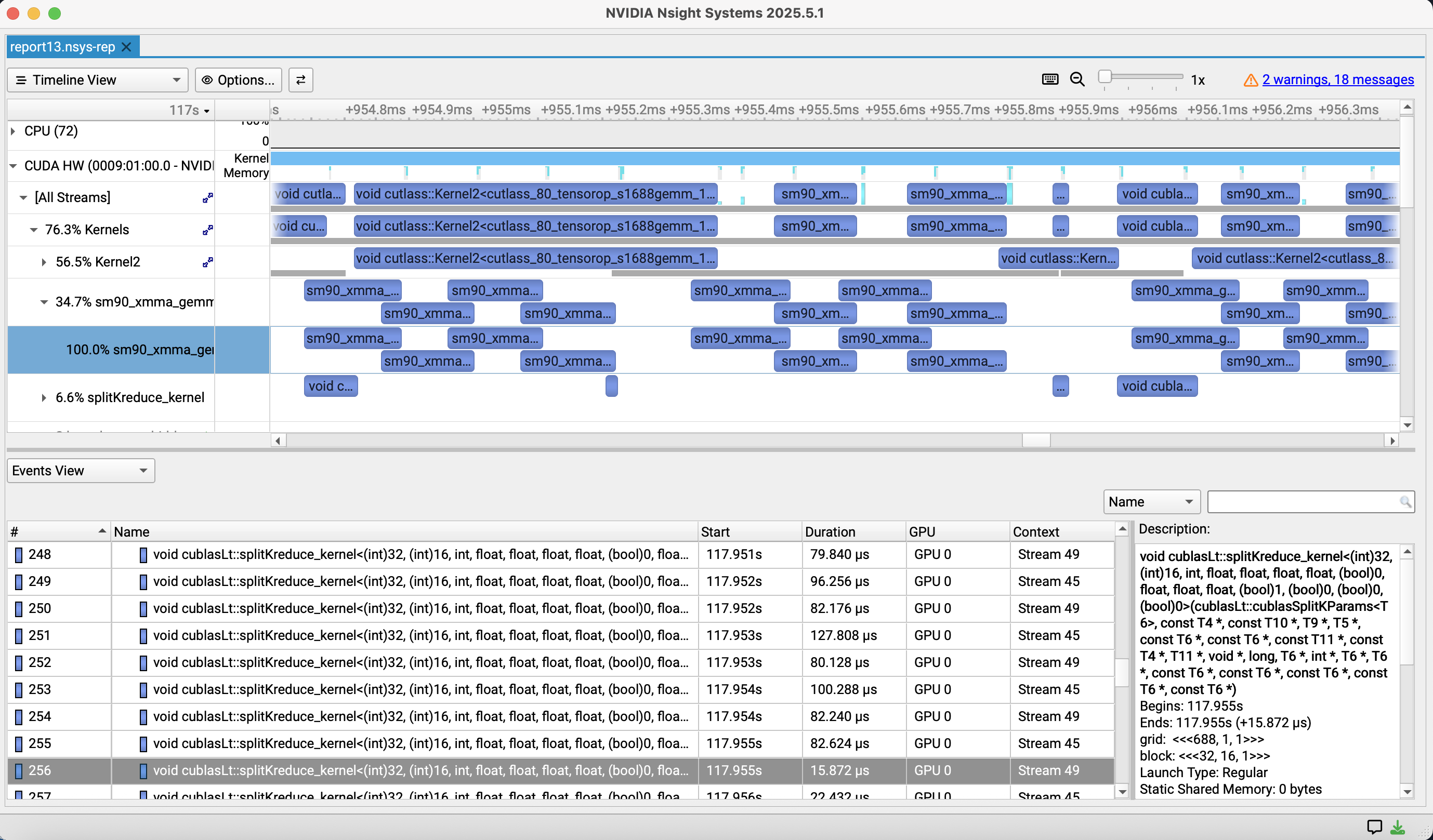
<p>Below is an example of an nsys profile opened in the Nsight Systems GUI. The timeline at the top shows which kernel runs on which stream and when, and the Events View at the bottom shows how long each kernel took.</p>

<p><img src="/assets/1025/workload.png" alt="Example of a profile in Nsight Systems" /></p>

<p>For serving engines that use CUDA Graphs, note that without <code class="language-plaintext highlighter-rouge">--cuda-graph-trace=node</code> the whole graph shows up as one item, and you can’t see the time of each kernel. Once you have measured times per kernel, put them next to the theoretical times in the table above and look at the measured / theoretical ratio. Kernels with a very bad ratio, and kernels that take time but aren’t in the table, are what you should optimize. If instead the whole step takes much longer than the sum of the kernel times, the problem is CPU-side scheduling or gaps between kernel launches (GPU idle time). Inference without CUDA Graphs often pays this kind of overhead.</p>

<p>This method takes effort, but its strength is that it tells you, kernel by kernel, where there is room to improve and how much.</p>

<h1 id="method-2-a-rough-estimate-from-every-weight-is-loaded-at-least-once">Method 2: A rough estimate from “every weight is loaded at least once”</h1>
<p>Method 1 is accurate, but listing every kernel is a lot of work when you’re just evaluating a new model or new hardware. Here a rough estimate helps: <strong>in decode, every step has to read every weight from memory at least once</strong>. The weights are far too big for the L2 cache (tens of MB), so they’re read from HBM again every step. So</p>

\[T_{\text{step}} \ge \frac{\text{bytes of weights}}{W}\]

<p>For MoE at batch size 1, you only read the active weights. Qwen3-30B-A3B has about 3.3B active parameters, so $6.6\,\text{GB} / 4.0\,\text{TB/s} \approx 1.65\,\text{ms}$, almost the same as the 1.62 ms from Method 1, from a single line of arithmetic. As the batch size grows, different tokens pick different experts, so you read more and more experts, and the time approaches $61\,\text{GB} / 4.0\,\text{TB/s} \approx 15\,\text{ms}$ for reading all parameters (about 30.5B, 61 GB). In prefill, too, many tokens are spread across all experts, so the amount of weights read is close to this number. Prefill, however, processes many tokens at once, so its arithmetic intensity is high and it can become compute bound.</p>

<h2 id="a-1t-parameter-dense-model-is-heavy">A 1T-parameter dense model is heavy</h2>
<p>Let’s apply this estimate to a 1T-parameter dense model. In BF16, the weights alone are 2 TB.</p>

<ul>
  <li>They don’t fit in a GH200’s HBM (96 GB) in the first place. You need at least 21 of them just to hold the weights.</li>
  <li>Even if one GPU could read all the weights, $2\,\text{TB} / 4.0\,\text{TB/s} = 0.5\,\text{s}$, so <strong>each token takes 0.5 seconds</strong>.</li>
  <li>Even if you use tensor parallelism on 21 GPUs and roughly assume the bandwidth scales 21 times, $2\,\text{TB} / 84\,\text{TB/s} \approx 24\,\text{ms}$, so the ceiling is about 40 tokens/s even ignoring communication.</li>
</ul>

<p>FP8 only halves this, so you can tell that running a 1T-class dense model locally is pretty much out of reach, without knowing anything about the kernels.</p>

<p>On the other hand, an MoE model like Kimi K2 has about 1T total parameters but only about 32B active per token. A token only needs to read the active weights, so the numerator of the estimate drops to under 1/30. This is one reason MoE has become the norm for huge models, and also why <strong>expert offload</strong>, which keeps unused experts in CPU memory, works.</p>

<h1 id="a-real-example-improving-freetoken">A real example: improving FreeToken</h1>
<p>Finally, here’s an example where an estimate actually led to a contribution: when I improved <a href="https://github.com/FlashML-org/FreeToken">FreeToken</a>. FreeToken is a serving engine for running huge models on your own machine. It offloads some of an MoE model’s experts to CPU memory and keeps only the frequently used experts cached on the GPU with LRU. When a needed expert isn’t in the cache (a cache miss), its weights are transferred from CPU memory to the GPU. Depending on the interconnect bandwidth, it can also run some of the work on the CPU.</p>

<h2 id="noticing-the-gap-between-estimate-and-measurement">Noticing the gap between estimate and measurement</h2>
<p>While measuring FreeToken on GH200, I took the number of cache misses during decode, multiplied it by the size of the expert weights transferred per miss (for BF16 Qwen3-30B-A3B, $3 \times 2048 \times 768 \times 2\,\text{B} \approx 9.4\,\text{MB}$ per expert), and divided by the time spent on the transfers. The effective bandwidth came out to only <strong>about 220 GB/s</strong>. GH200’s CPU-GPU link is NVLink-C2C at 450 GB/s per direction, and I had measured about 418 GB/s for a plain H2D copy with the copy engine. So the expert transfers were <strong>using only about half of the theoretical bandwidth</strong>.</p>

<table>
  <thead>
    <tr>
      <th>GH200, <code class="language-plaintext highlighter-rouge">ft bench bw</code></th>
      <th>GB/s</th>
    </tr>
  </thead>
  <tbody>
    <tr>
      <td>NVLink-C2C theoretical (H2D)</td>
      <td>450</td>
    </tr>
    <tr>
      <td>Plain H2D copy via the copy engine</td>
      <td>418</td>
    </tr>
    <tr>
      <td>Expert gather (nvfp4 / bf16 / mxfp4)</td>
      <td>222 / 202 / 212</td>
    </tr>
  </tbody>
</table>

<p>Instead of stopping at “I guess CPU-GPU transfers are just like this”, putting the number next to the theoretical value made it clear there was room to improve.</p>

<h2 id="cause-not-enough-requests-in-flight">Cause: not enough requests in flight</h2>
<p>The expert transfer was done by <code class="language-plaintext highlighter-rouge">fast_index_copy_multi</code>, a zero-copy gather kernel. Each thread loads 16 bytes from mapped host memory, stores them, and only then issues its next load. So the amount of data in flight per bank is about</p>

\[\mathtt{blocks\_per\_bank} \times \mathtt{num\_threads} \times 16\,\text{B}\]

<p>and by <a href="https://en.wikipedia.org/wiki/Little%27s_law">Little’s law</a> the bandwidth is set by</p>

\[\text{bandwidth} \approx \frac{\text{bytes in flight}}{\text{round-trip latency}}\]

<p>The default <code class="language-plaintext highlighter-rouge">blocks_per_bank=8</code> (8192 threads per bank) had been tuned on PCIe (about 31 GB/s). PCIe has low bandwidth, so that much in flight is enough to hide the latency and saturate the link. NVLink-C2C has much higher bandwidth, so hiding the same latency needs proportionally more requests in flight at once.</p>

<h2 id="the-fix-and-the-results">The fix and the results</h2>
<p>So I changed <code class="language-plaintext highlighter-rouge">blocks_per_bank</code> to 32 on hosts with NVLink-C2C (GH200 / GB200 / GB300) (<a href="https://github.com/FlashML-org/FreeToken/pull/610">PR #610</a>). At first, detecting the device by name initialized CUDA, which broke the engine’s assumption that it owns CUDA initialization, so I switched to an environment variable. In review, I got the suggestion to detect the device after the engine has bound its GPU (inside <code class="language-plaintext highlighter-rouge">_build_fused_copy_plan</code>). In the end it was <a href="https://github.com/FlashML-org/FreeToken/commit/c1a504a50b6ced2c28c5628d29df9885f0f3ae74">merged</a> with both automatic detection and an override via the <code class="language-plaintext highlighter-rouge">FREETOKEN_H2D_BLOCKS_PER_BANK</code> environment variable.</p>

<table>
  <thead>
    <tr>
      <th>Expert gather (GH200)</th>
      <th><code class="language-plaintext highlighter-rouge">blocks_per_bank=8</code></th>
      <th><code class="language-plaintext highlighter-rouge">blocks_per_bank=32</code></th>
    </tr>
  </thead>
  <tbody>
    <tr>
      <td>bf16</td>
      <td>202 GB/s</td>
      <td>408 GB/s</td>
    </tr>
    <tr>
      <td>nvfp4</td>
      <td>222 GB/s</td>
      <td>410 GB/s</td>
    </tr>
    <tr>
      <td>mxfp4</td>
      <td>212 GB/s</td>
      <td>408 GB/s</td>
    </tr>
  </tbody>
</table>

<p>That brought it almost up to the copy engine’s H2D ceiling (about 418 GB/s). The change itself is only a few lines, but I only noticed “this number is slow” because I computed the effective bandwidth from the cache miss count and transfer size and put it next to the theoretical value.</p>

<h1 id="summary">Summary</h1>
<ul>
  <li>Estimation matters both for knowing what percentage of the ceiling your implementation reaches and for catching measurement mistakes.</li>
  <li>Adding up $\max(F_k/P, B_k/W)$ over kernels gives a precise estimate that tells you where the room for improvement is, and you can check it with Nsight Systems.</li>
  <li>Even the one-line estimate “every weight is loaded at least once” shows that a 1T-class dense model is too heavy, and why MoE + offload works.</li>
  <li>The habit of computing effective bandwidth and comparing it with the theoretical value actually led to a performance improvement in an OSS project.</li>
</ul>]]></content><author><name>SuperHotDogCat</name></author><category term="Tech" /><summary type="html"><![CDATA[How to estimate the performance ceiling of a whole system before you measure it]]></summary></entry><entry xml:lang="ja"><title type="html">モデリングと見積もり-1</title><link href="https://superhotdogcat.github.io/ja/blog/2026/10/25/modelingestimation/" rel="alternate" type="text/html" title="モデリングと見積もり-1" /><published>2026-10-25T00:00:00+09:00</published><updated>2026-10-25T00:00:00+09:00</updated><id>https://superhotdogcat.github.io/ja/blog/2026/10/25/modelingestimation</id><content type="html" xml:base="https://superhotdogcat.github.io/ja/blog/2026/10/25/modelingestimation/"><![CDATA[<p>これは<a href="/ja/blog/2026/10/12/planning/">High Performance Computingのシリーズ連載</a>の一部です。</p>

<h1 id="このブログで話すこと">このブログで話すこと</h1>
<p><a href="/ja/blog/2026/10/19/howtoseecatalogspec/">前回の記事</a>では単一の計算関数, GPUカーネルにおいて理論性能を見る方法を紹介しました。しかし実際にはシステム全体の最適化をするような人が多いかと思います。そこで今回はシステム全体の性能の上限を見積もる方法を紹介します。この記事を読むことで高速計算における性能の上限を見積もることができるようになり, 分析の手助けや必要ハードウェアの見積もりに使うことができます。</p>

<h1 id="ハードウェアのスペック">ハードウェアのスペック</h1>

<table>
  <thead>
    <tr>
      <th>項目</th>
      <th>値</th>
    </tr>
  </thead>
  <tbody>
    <tr>
      <td>Machine</td>
      <td>NVIDIA GH200</td>
    </tr>
    <tr>
      <td>CPU FP32 FLOPS</td>
      <td>7.1 TFLOPS(計算値)</td>
    </tr>
    <tr>
      <td>CUDA FP32 FLOPS</td>
      <td>67 TFLOPS</td>
    </tr>
    <tr>
      <td>Tensor Core TF32 FLOPS</td>
      <td>494 TFLOPS</td>
    </tr>
    <tr>
      <td>Tensor Core BF16 FLOPS</td>
      <td>989 TFLOPS</td>
    </tr>
    <tr>
      <td>CPU Memory Bandwidth</td>
      <td>Up to 512GB/s</td>
    </tr>
    <tr>
      <td>GPU Memory Bandwidth</td>
      <td>4.0 TB/s</td>
    </tr>
    <tr>
      <td>CPU-GPU間 (NVLink-C2C)</td>
      <td>900 GB/s (片方向450 GB/s)</td>
    </tr>
  </tbody>
</table>

<h1 id="何故見積もりが重要か">何故見積もりが重要か</h1>
<p>この話は本来前回の記事ですべきだった気もしますが, 主に2つほど理由があると思います。</p>

<h2 id="1-最大性能を見積もるため">1. 最大性能を見積もるため</h2>
<p>1つ目の理由は高速化という話をするなら誰でもこの理由が真っ先に思い浮かぶ気がしますが, 最大性能を見積もるためです。<a href="/ja/blog/2026/10/19/howtoseecatalogspec/">前回の記事</a>では単一の計算関数, GPUカーネルにおいて理論性能を見る方法を紹介しました。何故これをする必要があるかというと, 最大性能のうち何%を出せたのかを言えないと正当な説明ができないためです。前回はCPUとGPUで計測した速度を比較しましたが, 何TFLOPS出たのか, それは理論値の何%なのかを知らないともしかしたらこれ以上高速化が可能かもしれないという懸念が残ってしまいます。ただし, 注意して欲しいのは見積もった最大性能が常に出るとは限らないことです。モデルの何かしらの見積もり漏れだったり, どうやってもアルゴリズム的に改善が難しい, CPUとGPUの間で消せないオーバーヘッドがあるなどで最大性能がでないこともあります。</p>

<h2 id="2-計測ミスを防ぐため">2. 計測ミスを防ぐため</h2>
<p>これは非常に重要なことです。計測をしていると計測中思わぬ出来事が起き, 「理論数値以上の速度」がでます。もしこれが起きたらあなたの測定が間違っている可能性が99.9999999%あります。例えば私は昔<code class="language-plaintext highlighter-rouge">-O3</code>オプションをつけて測定した1e9要素を持つ配列走査が1e-9秒のオーダーで終わりましたが, これはCPUの数クロック分の時間で10億要素の走査が終わったことになり, 現存するハードウェアではありえない速度です。このような結果を見た時にまず考えるべきことはなんでしょうか?もちろん見積もりです。1e9要素のintなら4GBでしょう。それを512GB/sのメモリから読み出したら最高効率でも8msはかかるはずです。この見積もりから明らかにおかしいことはわかりますよね？？？？この時はコンパイラによる<a href="https://ja.wikipedia.org/wiki/デッドコード削除">デッドコード削除</a>最適化が起こっており, このような結果となりました。<a href="https://ja.wikipedia.org/wiki/アセンブリ言語">アセンブリ</a>を確認することでも確かめられたミスです。このように, 見積もりは非常に大切です‼</p>

<h1 id="はじめに断っておくこと">はじめに断っておくこと</h1>
<p>ここから先で紹介する見積もり方は, 教科書的に体系立てられたものというより, 私が実際に実験と最適化を繰り返す中で「これをやっておくと助かる」と経験的に感じてきたものです。なので厳密な理論というよりは実践的な手順だと思って読んでください。また, ここで出てくる数値はあくまで<strong>上限</strong>の見積もりです。実際のハードウェアではクロックの変動, キャッシュの挙動, カーネル起動のオーバーヘッドなど様々な要因で理論値には届きません。大事なのは「理論値にどのくらい近いか」と「理論値を超えていないか」を常に意識することです。</p>

<h1 id="方法1-カーネルの実行時間を積み上げて厳密に見積もる">方法1: カーネルの実行時間を積み上げて厳密に見積もる</h1>
<p>1つ目は, 処理を構成するカーネル1つ1つについて理論時間を計算し, それを足し合わせることでシステム全体の時間を見積もる方法です。この記事全体ではLLM servingのdecode(1トークンずつ生成するフェーズ)を例にします。LLM Servingに限らずですが計測対象でどういった計算が走っているかをできるだけ厳密に把握し, その積み重ねで全体の時間が決まっていると考える基本的なモデリングがシステム全体の最適化には必要です。</p>

<h2 id="1カーネルあたりのモデル">1カーネルあたりのモデル</h2>
<p><a href="/ja/blog/2026/10/19/howtoseecatalogspec/">前回の記事</a>と同じ考え方で, カーネル $k$ の計算量を $F_k$ [FLOP], メモリ転送量を $B_k$ [byte], ピーク演算性能を $P$, メモリ帯域を $W$ とすると, カーネルの実行時間は</p>

\[t_k \ge \max\left(\frac{F_k}{P}, \frac{B_k}{W}\right)\]

<p>で下から抑えられます。そしてdecode 1 stepの時間は</p>

\[T_{\text{step}} \ge \sum_k \max\left(\frac{F_k}{P}, \frac{B_k}{W}\right)\]

<p>となります。</p>

<h2 id="qwen3-30b-a3bのdecodeを見積もる">Qwen3-30B-A3Bのdecodeを見積もる</h2>
<p>具体例として, MoE modelである<a href="https://huggingface.co/Qwen/Qwen3-30B-A3B-Thinking-2507">Qwen3-30B-A3B-Thinking</a>(hidden 2048, 48 layers, Q 32 heads / KV 4 heads, head_dim 128, expert数128のうち1 tokenあたり8個を使用, expertのintermediate 768, vocab 151936)をBF16, batch size 1, context長4096でdecodeする場合を考えます。batch size 1のdecodeでは行列積は行列ベクトル積になり, 計算量は重み1要素(2 byte)あたり2 FLOPしかありません。算術強度は約1 FLOP/byteで, GH200のridge point($989\,\text{TFLOPS} / 4.0\,\text{TB/s} \approx 247$ FLOP/byte)よりはるかに小さいため, 完全にmemory boundです。したがって $B_k / W$ だけ見れば十分です。</p>

<p>また, MoEなのでbatch size 1では128個のexpertのうちrouterが選んだ8個の重みしか読みません。1 layerあたりの主要なカーネルは以下のようになります。</p>

<table>
  <thead>
    <tr>
      <th>カーネル</th>
      <th>読む量</th>
      <th>理論時間 (4.0 TB/s)</th>
    </tr>
  </thead>
  <tbody>
    <tr>
      <td>QKV projection ($2048 \times 5120$)</td>
      <td>21.0 MB</td>
      <td>5.2 µs</td>
    </tr>
    <tr>
      <td>Attention (KV cache 4096 tokens分)</td>
      <td>8.4 MB</td>
      <td>2.1 µs</td>
    </tr>
    <tr>
      <td>O projection ($4096 \times 2048$)</td>
      <td>16.8 MB</td>
      <td>4.2 µs</td>
    </tr>
    <tr>
      <td>Router ($2048 \times 128$)</td>
      <td>0.5 MB</td>
      <td>0.1 µs</td>
    </tr>
    <tr>
      <td>Expert Gate/Up projection ($2048 \times 1536$ を8 expert分)</td>
      <td>50.3 MB</td>
      <td>12.6 µs</td>
    </tr>
    <tr>
      <td>Expert Down projection ($768 \times 2048$ を8 expert分)</td>
      <td>25.2 MB</td>
      <td>6.3 µs</td>
    </tr>
    <tr>
      <td>RMSNorm, QK norm, RoPE, top-k, SiLU×Mul, residual add など</td>
      <td>数十KB</td>
      <td>カーネル起動などにかかる小さな時間$t_{\min}$ で律速</td>
    </tr>
    <tr>
      <td><strong>合計</strong></td>
      <td><strong>122.2 MB</strong></td>
      <td><strong>30.5 µs + 小カーネル</strong></td>
    </tr>
  </tbody>
</table>

<p>これを48 layer分積み上げ, 最後のLM head($2048 \times 151936$, 622 MB, 156 µs)を足すと</p>

\[T_{\text{step}} \ge 48 \times 30.5\,\mu\text{s} + 156\,\mu\text{s} \approx 1.62\,\text{ms}\]

<p>となり, batch size 1では<strong>約617 tokens/sが上限</strong>ということがわかります。ただしMoEはrouterのtop-kやexpertごとのtokenの振り分けなど小さなカーネルが多くなりがちです。小カーネルが1 layerあたり8個あり, 仮にそれぞれ3 µsかかるとすると, $48 \times 8 \times 3\,\mu\text{s} \approx 1.15\,\text{ms}$ と, 重みを読む時間に匹敵するほど上乗せされます。これがkernel fusionやCUDA Graphが効く理由でもあります。</p>

<h2 id="nsight-systemsで答え合わせをする">Nsight Systemsで答え合わせをする</h2>
<p>見積もりを作ったら, 実際にどのカーネルが何µsかかっているのかを<a href="https://developer.nvidia.com/nsight-systems">Nsight Systems</a>で確認します。</p>

<div class="language-bash highlighter-rouge"><div class="highlight"><pre class="highlight"><code><span class="c"># 実行例</span>
nsys profile <span class="nt">-t</span> cuda,nvtx <span class="nt">--cuda-graph-trace</span><span class="o">=</span>node <span class="nt">-o</span> decode python bench_decode.py
nsys stats <span class="nt">--report</span> cuda_gpu_kern_sum decode.nsys-rep
</code></pre></div></div>

<p>以下はnsysで測定した結果をNsight SystemsのGUIで開いた時の例です。上部のタイムラインでどのstreamでいつどのカーネルが走っているかを, 下部のEvents Viewで各カーネルの実行時間を確認できます。</p>

<p><img src="/assets/1025/workload.png" alt="Nsight Systemsでの計測例" /></p>

<p>CUDA Graphを使っているservingエンジンでは, <code class="language-plaintext highlighter-rouge">--cuda-graph-trace=node</code> をつけないとグラフ全体が1つにまとめられてしまい, カーネルごとの時間が見えないので注意してください。カーネルごとの実測時間が取れたら, 上の表の理論時間と並べて「実測 / 理論」の比を見ます。比が極端に悪いカーネルや, 表に載っていないのに時間を食っているカーネルが最適化の対象になります。逆にstep全体の時間がカーネル時間の合計より大きく離れていれば, CPU側のスケジューリングやカーネル起動の隙間(GPUのアイドル)が問題だとわかります。CUDAGraphなどを使っていない推論ではこの手のオーバーヘッドがよくかかります。</p>

<p>この方法は手間がかかりますが, どこにどれだけ伸びしろがあるのかをカーネル単位で言えるのが強みです。</p>

<h1 id="方法2-重みは最低1回はloadされるから大雑把に見積もる">方法2: 「重みは最低1回はloadされる」から大雑把に見積もる</h1>
<p>方法1は正確ですが, 新しいモデルやハードウェアを検討する段階でいちいちカーネルを列挙するのは大変です。そこで使えるのが, <strong>decodeでは1 stepごとに全ての重みを最低1回はメモリから読まなければならない</strong>という観点からの大雑把な見積もりです。重みはL2キャッシュ(数十MB)には到底乗らないので, 毎step HBMから読み直すことになります。したがって</p>

\[T_{\text{step}} \ge \frac{\text{重みのbyte数}}{W}\]

<p>が成り立ちます。ここでMoEの場合, batch size 1なら読むのはactiveな重みだけです。Qwen3-30B-A3Bのactive parameterは約3.3Bなので $6.6\,\text{GB} / 4.0\,\text{TB/s} \approx 1.65\,\text{ms}$ となり, 方法1の1.62 msとほぼ同じ値がたった1行の計算で出てきます。一方でbatch sizeが大きくなるとtokenごとに違うexpertが選ばれるため, 読むexpertの数は増えていき, 最終的には全parameter(約30.5B, 61 GB)を読む $61\,\text{GB} / 4.0\,\text{TB/s} \approx 15\,\text{ms}$ に近づいていきます。Prefillでも多くのtokenが全expertに振り分けられるため, 読む重みの量としてはこちらに近くなります。ただしprefillは1度に多くのtokenを処理するので算術強度が高く, 計算律速になりえます。</p>

<h2 id="1t-parameter級のdense-modelは重い">1T parameter級のDense modelは重い</h2>
<p>この見積もりを1T parameterのDense modelに当てはめてみます。BF16なら重みだけで2 TBです。</p>

<ul>
  <li>そもそもGH200のHBM(96 GB)には乗りません。重みを置くだけでも最低21台が必要です。</li>
  <li>仮に1台で全ての重みを読めたとしても, $2\,\text{TB} / 4.0\,\text{TB/s} = 0.5\,\text{s}$ で, <strong>1 tokenに0.5秒</strong>かかります。</li>
  <li>21台でtensor parallelにして帯域を束ねて21倍になったとして大雑把に見積もっても $2\,\text{TB} / 84\,\text{TB/s} \approx 24\,\text{ms}$ で, 通信を無視しても40 tokens/s程度が上限です。</li>
</ul>

<p>FP8にしても半分になるだけなので, 1T級のDense modelを手元で動かすのはかなり無理があるということが, カーネルの詳細を一切知らなくてもわかります。</p>

<p>一方, Kimi K2のようなMoE modelは総パラメータが1T級でも, 1 tokenあたりに使われる(active)パラメータは32B程度です。1 tokenで読む必要がある重みはactiveな分だけなので, 見積もりの分子が30分の1以下になります。これが巨大モデルでMoEが主流になっている理由の1つであり, 使わないexpertをCPUメモリに逃がしておく <strong>expert offload</strong> という手法が成り立つ理由でもあります。</p>

<h1 id="実例-freetokenの改善">実例: FreeTokenの改善</h1>
<p>最後に, 実際に見積もりがコントリビュートに繋がった例として, 私が<a href="https://github.com/FlashML-org/FreeToken">FreeToken</a>を改善した時の話をします。FreeTokenは巨大なモデルを手元のマシンで動かすためのServing Engineで, MoE modelの一部expertをCPUメモリにoffloadし, GPU上にはよく使われるexpertだけをLRUでcacheしておく仕組みを持っています。cacheにないexpertが必要になると(cache miss), CPUメモリからGPUへexpertの重みを転送します。Interconnectの帯域幅によっては一部をCPUで実行したりもします。</p>

<h2 id="見積もりと実測のズレに気づく">見積もりと実測のズレに気づく</h2>
<p>GH200でFreeTokenを使って計測していた時, decode中のcache missの回数と, 1回のmissで転送されるexpertの重みのサイズ(例えばBF16のQwen3-30B-A3Bなら1 expertあたり $3 \times 2048 \times 768 \times 2\,\text{B} \approx 9.4\,\text{MB}$)を掛けて転送量を計算し, それを転送にかかっている時間で割ってみました。すると実効帯域は<strong>約220 GB/s</strong>にしかなっていませんでした。GH200のCPU-GPU間はNVLink-C2Cで片方向450 GB/s, copy engineで単純にH2Dコピーした場合でも約418 GB/s出ることが計測できていたので, expertの転送は<strong>理論帯域の半分程度しか使えていない</strong>ことになります。</p>

<table>
  <thead>
    <tr>
      <th>GH200, <code class="language-plaintext highlighter-rouge">ft bench bw</code></th>
      <th>GB/s</th>
    </tr>
  </thead>
  <tbody>
    <tr>
      <td>NVLink-C2C 理論値 (H2D)</td>
      <td>450</td>
    </tr>
    <tr>
      <td>copy engineによる単純なH2Dコピー</td>
      <td>418</td>
    </tr>
    <tr>
      <td>expert gather (nvfp4 / bf16 / mxfp4)</td>
      <td>222 / 202 / 212</td>
    </tr>
  </tbody>
</table>

<p>ここで「GPU-CPU間の転送ってこんなものか」で終わらせず, 理論値と並べて見たことで, 明らかに改善の余地があるとわかりました。</p>

<h2 id="原因-in-flightなリクエストが足りない">原因: in-flightなリクエストが足りない</h2>
<p>expertの転送は <code class="language-plaintext highlighter-rouge">fast_index_copy_multi</code> というzero-copyのgather kernelで行われていました。各threadはmapされたhostメモリから16 byteをloadして書き込み, それが終わってから次のloadを発行します。このため同時に飛んでいる(in-flightな)データ量は1 bankあたり</p>

\[\mathtt{blocks\_per\_bank} \times \mathtt{num\_threads} \times 16\,\text{B}\]

<p>程度になり, 帯域は<a href="https://ja.wikipedia.org/wiki/リトルの法則">Little’s law</a>によって</p>

\[\text{帯域} \approx \frac{\text{in-flightなbyte数}}{\text{往復レイテンシ}}\]

<p>で決まります。デフォルトの <code class="language-plaintext highlighter-rouge">blocks_per_bank=8</code> (1 bankあたり8192 threads)はPCIe(約31 GB/s)の環境でチューニングされた値でした。PCIeは帯域が小さいので, この程度のin-flight量でもレイテンシを隠して帯域を使い切れます。しかしNVLink-C2Cは帯域がずっと大きいので, 同じレイテンシを隠すにはそれに比例してより多くのリクエストを同時に飛ばす必要があります。</p>

<h2 id="修正と結果">修正と結果</h2>
<p>そこでNVLink-C2Cを持つホスト(GH200 / GB200 / GB300)では <code class="language-plaintext highlighter-rouge">blocks_per_bank</code> を32にするよう変更しました(<a href="https://github.com/FlashML-org/FreeToken/pull/610">PR #610</a>)。最初はデバイス名の判定でCUDAが初期化されてしまい, CUDAの初期化をengine側が管理するという前提を壊してしまったため環境変数での指定に切り替えたのですが, レビューでengineがGPUを確保した後(<code class="language-plaintext highlighter-rouge">_build_fused_copy_plan</code>の中)でデバイスを判定すればよいと提案をもらい, 最終的には自動判定と環境変数 <code class="language-plaintext highlighter-rouge">FREETOKEN_H2D_BLOCKS_PER_BANK</code> による上書きの両方に対応する形で<a href="https://github.com/FlashML-org/FreeToken/commit/c1a504a50b6ced2c28c5628d29df9885f0f3ae74">マージ</a>されました。</p>

<table>
  <thead>
    <tr>
      <th>expert gather (GH200)</th>
      <th><code class="language-plaintext highlighter-rouge">blocks_per_bank=8</code></th>
      <th><code class="language-plaintext highlighter-rouge">blocks_per_bank=32</code></th>
    </tr>
  </thead>
  <tbody>
    <tr>
      <td>bf16</td>
      <td>202 GB/s</td>
      <td>408 GB/s</td>
    </tr>
    <tr>
      <td>nvfp4</td>
      <td>222 GB/s</td>
      <td>410 GB/s</td>
    </tr>
    <tr>
      <td>mxfp4</td>
      <td>212 GB/s</td>
      <td>408 GB/s</td>
    </tr>
  </tbody>
</table>

<p>copy engineによるH2Dコピーの上限(約418 GB/s)にほぼ並ぶところまで改善できました。変更自体は数行ですが, そもそも「この数字は遅い」と気づけたのは, cache miss回数と転送量から実効帯域を計算し, 理論値と並べて見たからです。</p>

<h1 id="まとめ">まとめ</h1>
<ul>
  <li>見積もりは, 自分の実装が上限の何%を出せているかを知るためと, 計測ミスに気づくための両方で重要です。</li>
  <li>カーネルごとに $\max(F_k/P, B_k/W)$ を積み上げると, どこに伸びしろがあるかまで言える精密な見積もりができ, Nsight Systemsで答え合わせができます。</li>
  <li>「重みは最低1回loadされる」という1行の見積もりだけでも, 1T級のDense modelが重すぎることや, MoE + offloadが有効な理由がわかります。</li>
  <li>実効帯域を計算して理論値と比べる習慣が, 実際にOSSへの性能改善に繋がりました。</li>
</ul>]]></content><author><name>SuperHotDogCat</name></author><category term="技術記事" /><summary type="html"><![CDATA[システム全体の測定をする際に性能の見積もりをする方法を紹介します]]></summary></entry><entry xml:lang="en"><title type="html">Reading Measurements Against Catalog Specs - 1</title><link href="https://superhotdogcat.github.io/blog/2026/10/19/howtoseecatalogspec/" rel="alternate" type="text/html" title="Reading Measurements Against Catalog Specs - 1" /><published>2026-10-19T00:00:00+09:00</published><updated>2026-10-19T00:00:00+09:00</updated><id>https://superhotdogcat.github.io/blog/2026/10/19/howtoseecatalogspec</id><content type="html" xml:base="https://superhotdogcat.github.io/blog/2026/10/19/howtoseecatalogspec/"><![CDATA[<p>This post is part of <a href="/blog/2026/10/12/planning/">my series on High Performance Computing</a>.</p>

<h1 id="what-this-post-covers">What this post covers</h1>
<p>This post is mainly about what you should think about when you look at experimental data. You need this to judge whether a measurement is valid. I’ll go through how to check whether <strong>a measured number is really what it should be</strong> by comparing it with the catalog specs on the datasheet.</p>

<h1 id="hardware-specs">Hardware specs</h1>

<table>
  <tbody>
    <tr>
      <td>Machine</td>
      <td>NVIDIA GH200</td>
    </tr>
    <tr>
      <td>CPU FP32 FLOPS</td>
      <td>7.1 TFLOPS (calculated)</td>
    </tr>
    <tr>
      <td>CUDA FP32 FLOPS</td>
      <td>67 TFLOPS</td>
    </tr>
    <tr>
      <td>Tensor Core FP32 FLOPS</td>
      <td>494 TFLOPS</td>
    </tr>
    <tr>
      <td>CPU Memory Bandwidth</td>
      <td>Up to 512GB/s</td>
    </tr>
    <tr>
      <td>GPU Memory Bandwidth</td>
      <td>4.0 TB/s</td>
    </tr>
  </tbody>
</table>

<h1 id="reasoning-from-the-hardware-specs">Reasoning from the hardware specs</h1>
<p>To keep things simple, the discussion below uses matrix multiplication. Given square matrices $A, B, C \in \mathbb{R}^{N \times N}$, consider the product</p>

\[C = AB\]

<p>For $N = 512$, here are the results for a naive matmul, NumPy’s matmul, PyTorch’s matmul, and PyTorch’s matmul using Tensor Cores. Everything is FP32, and the code is in <a href="/assets/1019/matmulprofile.zip">Materials</a> (run it with run_all.sh).</p>

<table>
  <thead>
    <tr>
      <th>Method</th>
      <th>Time (ms)</th>
    </tr>
  </thead>
  <tbody>
    <tr>
      <td>CPU (Naive)</td>
      <td>93.81</td>
    </tr>
    <tr>
      <td>CPU (Numpy)</td>
      <td>1.576e-01</td>
    </tr>
    <tr>
      <td>GPU (Non Tensor Core)</td>
      <td>1.723e-02</td>
    </tr>
    <tr>
      <td>GPU (Tensor Core)</td>
      <td>1.304e-02</td>
    </tr>
  </tbody>
</table>

<p>So what can we tell from these results? First, the naive CPU code is the slowest. It’s simple code that even a freshman who just started programming could write; it looks like the code below. I won’t cover it in this post, but the other methods get their speed from techniques like loop unrolling, tiling, SIMD, shared memory and Tensor Cores.</p>

<pre><code class="language-C">void matmul(int n, const float *A, const float *B, float *C) {
    for (int i = 0; i &lt; n; i++)
        for (int j = 0; j &lt; n; j++) {
            float sum = 0.0f;
            for (int k = 0; k &lt; n; k++) sum += A[i * n + k] * B[k * n + j];
            C[i * n + j] = sum;
        }
}
</code></pre>

<p>Now for the main topic. CPU (Numpy) certainly looks faster than the naive CPU matmul. But is this result optimal? In other words, does it get enough performance out of the hardware?</p>

<table>
  <thead>
    <tr>
      <th>Method</th>
      <th>Time (ms)</th>
    </tr>
  </thead>
  <tbody>
    <tr>
      <td>CPU (Naive)</td>
      <td>93.81</td>
    </tr>
    <tr>
      <td>CPU (Numpy)</td>
      <td>1.576e-01</td>
    </tr>
    <tr>
      <td>GPU (Non Tensor Core)</td>
      <td>1.723e-02</td>
    </tr>
    <tr>
      <td>GPU (Tensor Core)</td>
      <td>1.304e-02</td>
    </tr>
  </tbody>
</table>

<p>One yardstick is to compare against the theoretical FLOPS. A matmul takes $2N^3$ FLOPs, so the achieved FLOPS are</p>

<table>
  <thead>
    <tr>
      <th>Method</th>
      <th>Time (ms)</th>
      <th>GFLOPS</th>
    </tr>
  </thead>
  <tbody>
    <tr>
      <td>CPU (Naive)</td>
      <td>93.81</td>
      <td>2.86</td>
    </tr>
    <tr>
      <td>CPU (Numpy)</td>
      <td>1.576e-01</td>
      <td>1704</td>
    </tr>
    <tr>
      <td>GPU (Non Tensor Core)</td>
      <td>1.723e-02</td>
      <td>15576</td>
    </tr>
    <tr>
      <td>GPU (Tensor Core)</td>
      <td>1.304e-02</td>
      <td>20584</td>
    </tr>
  </tbody>
</table>

<p>The naive CPU matmul reaches only 0.040% of the CPU’s theoretical 7.1 TFLOPS, so it’s fair to say it isn’t using the hardware. What about the others? Are they getting the performance out of the hardware? At this point most people would probably say no: CPU (Numpy) reaches 24% of 7.1 TFLOPS, GPU (Non Tensor Core) 23% of 67 TFLOPS, and GPU (Tensor Core) only 4.2% of 494 TFLOPS. Why is that? Are NumPy and PyTorch actually poorly optimized?</p>

<h1 id="roofline">Roofline</h1>

<p><img src="/assets/1019/Roofline-intro.png" alt="" />
Image from <a href="#ref-nersc">NERSC Documentation [2]</a></p>

<p>The tool for answering that question is the Roofline model. The “theoretical FLOPS” in a catalog spec is what you get when the arithmetic units run nonstop. A real program, however, has to bring the data for those units in from memory, and if the data supply can’t keep up, the units sit waiting. The Roofline model <a href="#ref-roofline">[1]</a> shows in a single figure whether performance is limited by <strong>how fast you compute</strong> or by <strong>how fast you move data</strong>.</p>

<h2 id="the-roofline-equations">The Roofline equations</h2>
<p>First, define the following quantities.</p>

<ul>
  <li>$W$ [FLOP]: the number of floating-point operations the program performs</li>
  <li>$Q$ [Byte]: the amount of data the program moves to and from memory (here, RAM)</li>
  <li>$P_{\mathrm{peak}}$ [FLOP/s]: the hardware’s theoretical FLOPS</li>
  <li>$B$ [Byte/s]: the hardware’s memory bandwidth</li>
</ul>

<p>Computation takes at least $W / P_{\mathrm{peak}}$, and data transfer takes at least $Q / B$. Even if computation and transfer overlap perfectly, the run time $T$ can’t be shorter than the slower of the two.</p>

\[T \geq \max\left(\frac{W}{P_{\mathrm{peak}}}, \frac{Q}{B}\right)\]

<p>Rewriting this in terms of achieved FLOPS $P = W / T$ gives</p>

\[P \leq \min\left(P_{\mathrm{peak}}, \frac{W}{Q} \cdot B\right) = \min\left(P_{\mathrm{peak}}, I \cdot B\right)\]

<p>where</p>

\[I = \frac{W}{Q} \quad [\mathrm{FLOP/Byte}]\]

<p>is called the <strong>arithmetic intensity</strong>: how many operations you perform per byte of data you bring in. That’s all there is to the Roofline model. If you plot $I$ on the horizontal axis and $P$ on the vertical axis, both log-scale, the upper bound is a diagonal line of slope 1 ($I \cdot B$) joined to a horizontal line ($P_{\mathrm{peak}}$), which looks like a roof. That’s where the name Roofline comes from.</p>

<p><img src="/assets/1019/Roofline-intro.png" alt="" /></p>

<p>The point where the two lines meet,</p>

\[I^{*} = \frac{P_{\mathrm{peak}}}{B}\]

<p>is called the <strong>ridge point</strong>.</p>

<ul>
  <li>A program with $I &lt; I^{*}$ is <strong>memory bound</strong>. Faster arithmetic units won’t help; the bound is set by $I \cdot B$.</li>
  <li>A program with $I &gt; I^{*}$ is <strong>compute bound</strong>. The bound is set by $P_{\mathrm{peak}}$.</li>
</ul>

<p>So a measurement should be judged <strong>not against the theoretical FLOPS, but against the Roofline bound $\min(P_{\mathrm{peak}}, I \cdot B)$</strong>. Even if a memory-bound program reaches only 5% of the theoretical FLOPS, it’s getting the most out of the hardware if it’s close to $I \cdot B$.</p>

<h2 id="the-ridge-point-of-gh200">The ridge point of GH200</h2>
<p>Let’s compute the ridge points from the spec table at the top.</p>

<table>
  <thead>
    <tr>
      <th>Unit</th>
      <th>$P_{\mathrm{peak}}$</th>
      <th>$B$</th>
      <th>$I^{*}$ [FLOP/Byte]</th>
    </tr>
  </thead>
  <tbody>
    <tr>
      <td>CPU (Grace, FP32)</td>
      <td>7.1 TFLOPS</td>
      <td>512 GB/s</td>
      <td>13.9</td>
    </tr>
    <tr>
      <td>GPU (CUDA Core, FP32)</td>
      <td>67 TFLOPS</td>
      <td>4.0 TB/s</td>
      <td>16.75</td>
    </tr>
    <tr>
      <td>GPU (Tensor Core, TF32)</td>
      <td>494 TFLOPS</td>
      <td>4.0 TB/s</td>
      <td>123.5</td>
    </tr>
  </tbody>
</table>

<p>To be compute bound on Tensor Cores, you need 123.5 operations for every byte you read, or about 500 operations per FP32 value (4 bytes). Memory is very slow relative to the arithmetic units.
This also explains why each new GPU generation puts so much weight on HBM bandwidth. And since algorithms that reuse each loaded value 100+ times are almost all matmul-like, you can see that most algorithms are memory bound.</p>

<h2 id="arithmetic-intensity-of-matmul">Arithmetic intensity of matmul</h2>
<p>Now let’s find the arithmetic intensity of $C = AB$. Each element of $C$ is a dot product of length $N$, with $N$ multiplies and $N$ adds, so</p>

\[W = 2N^3\]

<p>The data transfer $Q$, unlike $W$, depends on the implementation and the cache size, so it isn’t uniquely determined. So when evaluating hardware performance, we consider <strong>a lower bound $Q_{\min}$ that no implementation can go below</strong>. Since $Q \geq Q_{\min}$, the arithmetic intensity has an upper bound $I \leq I_{\max} = W / Q_{\min}$, and the Roofline bound becomes $P \leq \min(P_{\mathrm{peak}}, I_{\max} \cdot B)$.</p>

<p>The simplest lower bound is that you must read $A$ and $B$ at least once and write $C$ at least once (compulsory traffic). In FP32 (4 bytes) that is</p>

\[Q_{\min} \geq 3 \times 4N^2 = 12N^2 \quad [\mathrm{Byte}]\]

<p>and using only this bound,</p>

\[I_{\max} = \frac{2N^3}{12N^2} = \frac{N}{6}\]

<p>From this alone, it looks as if the arithmetic intensity of matmul grows without limit as $N$ grows.</p>

<h3 id="a-lower-bound-from-the-red-blue-pebble-game">A lower bound from the red-blue pebble game</h3>
<p>However, the $12N^2$ bound is achievable only when all three matrices fit in cache. When they don’t, data that was evicted from the cache has to be read back from DRAM. The question “how much data must move, at minimum, between a fast memory of capacity $M$ and an unlimited slow memory?” was formalized by Hong and Kung as the <strong>red-blue pebble game</strong> <a href="#ref-hongkung">[3]</a>. Red pebbles represent data in fast memory (cache), blue pebbles represent data in slow memory (DRAM), and at most $M$ red pebbles can be on the board at once. Under these rules, you ask for the minimum number of red↔blue swaps needed to finish computing the whole computation graph.</p>

<p>Hong and Kung showed that the data transfer of standard $O(N^3)$ matmul (excluding Strassen-like algorithms) is $\Omega(N^3 / \sqrt{M})$. Later, Smith et al. <a href="#ref-smith">[4]</a> gave a tight bound including constants: with $S$ words of fast memory, the transfer is asymptotically at least $2N^3 / \sqrt{S}$ words. Converting to bytes with $M$ [Byte] $= 4S$,</p>

\[Q_{\min} \gtrsim \max\left(12N^2, \frac{16N^3}{\sqrt{M}}\right) \quad [\mathrm{Byte}]\]

<p>and the upper bound on arithmetic intensity is</p>

\[I_{\max} \lesssim \min\left(\frac{N}{6}, \frac{\sqrt{M}}{8}\right) \quad [\mathrm{FLOP/Byte}]\]

<p>So the correct conclusion is that <strong>the arithmetic intensity of matmul does not grow without limit with $N$; it is capped by the cache size, $\sqrt{M}$</strong>. $N/6$ is only valid under the condition that all three matrices fit in cache. Optimizations such as tiling are about bringing the actual $Q$ close to this lower bound.</p>

<p>Estimating this for GH200: the GPU side (H100) has a 50 MB L2 cache, giving $\sqrt{M}/8 \approx 880$ FLOP/Byte, and the CPU side (Grace) has a 117 MB L3 cache, giving $\sqrt{M}/8 \approx 1350$ FLOP/Byte. Both are well above the ridge points (123.5 at most), so <strong>as far as DRAM traffic is concerned, GH200 can make large matmuls compute bound</strong> if the cache is used well. The same argument, however, applies at each level of the hierarchy, “L2 ↔ shared memory” and “shared memory ↔ registers”. Smaller levels have a smaller $\sqrt{M}$, so the bandwidth at each level can also become the bottleneck.</p>

<p>Now, when $N$ is small enough that all three matrices fit in cache, $I_{\max} = N/6$ applies as is. The matrix size that crosses the ridge point, $N^{*} = 6I^{*}$, is</p>

<table>
  <thead>
    <tr>
      <th>Unit</th>
      <th>$I^{*}$</th>
      <th>$N^{*} = 6I^{*}$</th>
    </tr>
  </thead>
  <tbody>
    <tr>
      <td>CPU (Grace, FP32)</td>
      <td>13.9</td>
      <td>83</td>
    </tr>
    <tr>
      <td>GPU (CUDA Core, FP32)</td>
      <td>16.75</td>
      <td>101</td>
    </tr>
    <tr>
      <td>GPU (Tensor Core, TF32)</td>
      <td>123.5</td>
      <td>741</td>
    </tr>
  </tbody>
</table>

<h2 id="revisiting-the-n--512-results-with-roofline">Revisiting the $N = 512$ results with Roofline</h2>
<p>At $N = 512$, the three matrices total 3.1 MB, which fits easily in both the GPU’s L2 cache (50 MB) and Grace’s L3 cache (117 MB), so $I_{\max} = 512 / 6 \approx 85.3$ FLOP/Byte. The Roofline bounds are</p>

<ul>
  <li>CPU: $\min(7.1\,\mathrm{T}, 85.3 \times 512\,\mathrm{G}) = 7.1$ TFLOPS (compute bound)</li>
  <li>GPU (Non Tensor Core): $\min(67\,\mathrm{T}, 85.3 \times 4.0\,\mathrm{T}) = 67$ TFLOPS (compute bound)</li>
  <li>GPU (Tensor Core): $\min(494\,\mathrm{T}, 85.3 \times 4.0\,\mathrm{T}) = 341$ TFLOPS (memory bound)</li>
</ul>

<p>and the fraction of the Roofline bound achieved is shown below. I’ve been explaining all this with a lot of confidence, but it turns out NumPy and PyTorch’s regular FP32 kernel reach only 23–24%. I ran these experiments for the first time while writing this post, so this was a bit of a surprise.</p>

<table>
  <thead>
    <tr>
      <th>Method</th>
      <th>GFLOPS</th>
      <th>Roofline bound (GFLOPS)</th>
      <th>Achieved</th>
    </tr>
  </thead>
  <tbody>
    <tr>
      <td>CPU (Numpy)</td>
      <td>1704</td>
      <td>7100</td>
      <td>24%</td>
    </tr>
    <tr>
      <td>GPU (Non Tensor Core)</td>
      <td>15576</td>
      <td>67000</td>
      <td>23%</td>
    </tr>
    <tr>
      <td>GPU (Tensor Core)</td>
      <td>20584</td>
      <td>341000</td>
      <td>6.0%</td>
    </tr>
  </tbody>
</table>

<p>Since $N = 512$ is smaller than $N^{*} = 741$, the Tensor Core case is memory bound and its bound drops to about 70% of the theoretical FLOPS (341 TFLOPS), yet it still reaches only about 6%. CPU (Numpy) and GPU (Non Tensor Core) also stay in the 20% range of their compute-bound limits. <strong>Roofline alone still doesn’t explain it.</strong></p>

<p>Poor Tensor Core performance on small matmuls has also been raised as a problem in research. KAMI <a href="#ref-kami">[5]</a>, presented at SC25, points out that while large GEMMs already run close to GPU peak performance, small and batched GEMMs still leave a lot of room for optimization. For small matrices, data exchange within a single thread block, that is, communication between registers and shared memory, limits performance. KAMI addresses this by bringing communication-avoiding (CA) matmul algorithms (1D/2D/3D), developed for distributed memory, inside a single GPU. It treats Tensor Cores as compute nodes, registers as local memory and shared memory as the communication channel, applying the transfer lower-bound argument above to each level of the memory hierarchy. You can see it as a concrete example of “the red-blue pebble game bound applies at every level of the hierarchy”.</p>

<h2 id="what-roofline-doesnt-show-fixed-costs">What Roofline doesn’t show: fixed costs</h2>
<p>Another factor Roofline doesn’t capture is <strong>fixed costs that don’t depend on problem size</strong>. On the GPU these include kernel launch (around 1–2 µs), PyTorch dispatch and synchronization; on the CPU, library call overhead and thread startup and synchronization (fork/join). Here I’ll just estimate the orders of magnitude.</p>

<p>At $N = 512$, putting the compute time $W / P_{\mathrm{peak}}$ and transfer time $Q_{\min} / B$ next to the measurements gives</p>

<table>
  <thead>
    <tr>
      <th>Method</th>
      <th>Compute time</th>
      <th>Transfer time</th>
      <th>Measured</th>
      <th>Difference ($T_0$)</th>
    </tr>
  </thead>
  <tbody>
    <tr>
      <td>CPU (Numpy)</td>
      <td>38 µs</td>
      <td>6.1 µs</td>
      <td>158 µs</td>
      <td>~120 µs</td>
    </tr>
    <tr>
      <td>GPU (Non Tensor Core)</td>
      <td>4.0 µs</td>
      <td>0.79 µs</td>
      <td>17.2 µs</td>
      <td>~13 µs</td>
    </tr>
    <tr>
      <td>GPU (Tensor Core)</td>
      <td>0.54 µs</td>
      <td>0.79 µs</td>
      <td>13.0 µs</td>
      <td>~12 µs</td>
    </tr>
  </tbody>
</table>

<p>On the GPU, compute and transfer take a few µs or less, yet the run takes over 10 µs. Moreover, the difference $T_0$ is about 12–13 µs for both FP32 and Tensor Cores, which shows a roughly constant cost that doesn’t depend on the arithmetic unit. The CPU likewise seems to carry a fixed cost on the order of 100 µs.</p>

<p>So consider a simple model with a fixed cost $T_0$:</p>

\[T \approx T_0 + \max\left(\frac{W}{P_{\mathrm{peak}}}, \frac{Q}{B}\right)\]

<p>To reach 80% of the theoretical FLOPS in the compute-bound regime, you need $W / P_{\mathrm{peak}} \geq 4T_0$, that is,</p>

\[2N^3 \geq 4 T_0 P_{\mathrm{peak}} \quad \Longrightarrow \quad N \geq \left(2 T_0 P_{\mathrm{peak}}\right)^{1/3}\]

<p>Plugging in the $T_0$ values above gives $N \approx 1200$ for CPU (Numpy), $N \approx 1200$ for GPU (Non Tensor Core) and $N \approx 2300$ for GPU (Tensor Core). The higher the theoretical FLOPS, the more work could have been done during the fixed cost, so hiding it takes a larger problem. $T_0$ isn’t really constant, so this is only an order-of-magnitude estimate, but it does show that “$N = 512$ is still too small to compare against the theoretical FLOPS”.</p>

<h2 id="achieved-flops-across-matrix-sizes">Achieved FLOPS across matrix sizes</h2>
<p>Next, let’s look at measurements with varying $N$. The horizontal axis is the matrix size $N$, the vertical axis is achieved FLOPS, and the dotted lines are the theoretical FLOPS. You can see that the plots take a Roofline-like shape. During the experiments, the Claude Code I was using started optimizing the CPU matmul on its own, so I’ve included that result too: it’s CPU (NEON+OpenMP, 72 threads).</p>

<p><img src="/assets/1019/cpu_flops.png" alt="" /></p>

<p><img src="/assets/1019/gpu_flops.png" alt="" /></p>

<p>Every implementation gets faster as $N$ grows and eventually saturates. Comparing the saturated values with the theoretical FLOPS:</p>

<table>
  <thead>
    <tr>
      <th>Method</th>
      <th>Max achieved FLOPS</th>
      <th>Theoretical FLOPS</th>
      <th>Achieved</th>
    </tr>
  </thead>
  <tbody>
    <tr>
      <td>CPU (Naive, 1 thread)</td>
      <td>4.3 GFLOPS</td>
      <td>99.2 GFLOPS (1 core)</td>
      <td>4.3%</td>
    </tr>
    <tr>
      <td>CPU (NEON+OpenMP, 72 threads)</td>
      <td>3.2 TFLOPS</td>
      <td>7.1 TFLOPS</td>
      <td>45%</td>
    </tr>
    <tr>
      <td>CPU (Numpy, OpenBLAS 64 threads)</td>
      <td>4.5 TFLOPS</td>
      <td>7.1 TFLOPS</td>
      <td>63%</td>
    </tr>
    <tr>
      <td>GPU (PyTorch FP32)</td>
      <td>51.5 TFLOPS</td>
      <td>67 TFLOPS</td>
      <td>77%</td>
    </tr>
    <tr>
      <td>GPU (PyTorch TF32)</td>
      <td>399 TFLOPS</td>
      <td>494 TFLOPS</td>
      <td>81%</td>
    </tr>
  </tbody>
</table>

<p>A few things stand out.</p>

<p><strong>The GPU reaches about 80% of the theoretical FLOPS.</strong> GPU performance saturates around $N = 2^{11}$ for TF32 and around $N = 2^{10} \sim 2^{11}$ for FP32, which matches the order of the fixed-cost estimates above (about 2300 and 1200, respectively). For large enough $N$, the arithmetic intensity $N/6 \gg I^{*}$, so the workload is compute bound and the bound is the theoretical FLOPS. Even highly optimized libraries like cuBLAS almost never reach 100% of the theoretical FLOPS; 70–90% is a reasonable practical ceiling.</p>

<p><strong>The naive implementation gets even slower at large $N$.</strong> The naive implementation reaches only about 4% of a single core’s theoretical 99.2 GFLOPS, and drops to 1.4 GFLOPS at $N = 2^{10}$. The innermost <code class="language-plaintext highlighter-rouge">B[k * n + j]</code> reads $B$ down a column with a stride of $4N$ bytes, so once the matrices no longer fit in cache, each 4-byte element costs a whole 64-byte cache line from memory. The actual $Q$ is then far larger than the lower bound $Q_{\min}$, and the actual arithmetic intensity is not $N/6$ but well below 1 FLOP/Byte. The naive implementation is a textbook memory-bound program, stuck on the diagonal line of the Roofline.</p>

<h2 id="summary">Summary</h2>
<p>To judge whether a measurement gets the most out of the hardware, the following steps are a good way to think about it.</p>

<ol>
  <li>From the operation count $W$ and the lower bound on data transfer $Q_{\min}$, find the upper bound on arithmetic intensity $I_{\max} = W / Q_{\min}$. If the data doesn’t fit in cache, also take the red-blue pebble game bound into account.</li>
  <li>From the catalog specs, find $I^{*} = P_{\mathrm{peak}} / B$ and decide whether the workload is memory bound or compute bound.</li>
  <li>Compare the measurement not with the theoretical FLOPS but with the Roofline bound $\min(P_{\mathrm{peak}}, I_{\max} \cdot B)$.</li>
  <li>If it’s far from the bound, check the implementation and improve it (though, of course, other factors may make further improvement impossible).</li>
</ol>

<p>I hope this helps you reason about whether a single function you call every day is reaching its theoretical performance.</p>

<p>After reading this post, you should be able to answer questions like why memory bandwidth matters and how to estimate peak performance accurately!</p>

<h1 id="reference">Reference</h1>

<p><span id="ref-roofline"></span>[1] S. Williams, A. Waterman, D. Patterson, “Roofline: An Insightful Visual Performance Model for Multicore Architectures”, Communications of the ACM, 2009, <a href="https://doi.org/10.1145/1498765.1498785">https://doi.org/10.1145/1498765.1498785</a></p>

<p><span id="ref-nersc"></span>[2] NERSC Documentation, Roofline Performance Model, <a href="https://docs.nersc.gov/tools/performance/roofline/">https://docs.nersc.gov/tools/performance/roofline/</a></p>

<p><span id="ref-hongkung"></span>[3] J.-W. Hong, H. T. Kung, “I/O Complexity: The Red-Blue Pebble Game”, STOC, 1981, <a href="https://doi.org/10.1145/800076.802486">https://doi.org/10.1145/800076.802486</a></p>

<p><span id="ref-smith"></span>[4] T. M. Smith, B. Lowery, J. Langou, R. A. van de Geijn, “A Tight I/O Lower Bound for Matrix Multiplication”, arXiv:1702.02017, 2017, <a href="https://arxiv.org/abs/1702.02017">https://arxiv.org/abs/1702.02017</a></p>

<p><span id="ref-kami"></span>[5] H. Wang, Y. Du, S. Li, X. Tian, Q. Sun, W. Liu, “KAMI: Communication-Avoiding General Matrix Multiplication within a Single GPU”, SC ‘25, <a href="https://sc25.conference-program.com/presentation/?id=pap926&amp;sess=sess285">https://sc25.conference-program.com/presentation/?id=pap926&amp;sess=sess285</a></p>]]></content><author><name>SuperHotDogCat</name></author><category term="Tech" /><summary type="html"><![CDATA[How to read experimental data against catalog specs]]></summary></entry><entry xml:lang="ja"><title type="html">実験データとカタログスペックの見方-1</title><link href="https://superhotdogcat.github.io/ja/blog/2026/10/19/howtoseecatalogspec/" rel="alternate" type="text/html" title="実験データとカタログスペックの見方-1" /><published>2026-10-19T00:00:00+09:00</published><updated>2026-10-19T00:00:00+09:00</updated><id>https://superhotdogcat.github.io/ja/blog/2026/10/19/howtoseecatalogspec</id><content type="html" xml:base="https://superhotdogcat.github.io/ja/blog/2026/10/19/howtoseecatalogspec/"><![CDATA[<p>これは<a href="/ja/blog/2026/10/12/planning/">High Performance Computingのシリーズ連載</a>の一部です。</p>

<h1 id="このブログで話すこと">このブログで話すこと</h1>
<p>このブログは主に実験データを見たときに何を考えるべきかを書きます。これは実験データの計測結果の妥当性を考えるために必要です。計測結果が<strong>本当にこの計測値で良いのか</strong>をデータシートのカタログスペックと照らし合わせながら検証する方法を扱います。</p>

<h1 id="ハードウェアのスペック">ハードウェアのスペック</h1>
<!-- あとで書く -->

<table>
  <tbody>
    <tr>
      <td>Machine</td>
      <td>NVIDIA GH200</td>
    </tr>
    <tr>
      <td>CPU FP32 FLOPS</td>
      <td>7.1 TFLOPS(計算値)</td>
    </tr>
    <tr>
      <td>CUDA FP32 FLOPS</td>
      <td>67 TFLOPS</td>
    </tr>
    <tr>
      <td>Tensor Core FP32 FLOPS</td>
      <td>494 TFLOPS</td>
    </tr>
    <tr>
      <td>CPU Memory Bandwidth</td>
      <td>Up to 512GB/s</td>
    </tr>
    <tr>
      <td>GPU Memory Bandwidth</td>
      <td>4.0 TB/s</td>
    </tr>
  </tbody>
</table>

<h1 id="ハードウェアのスペック値から考察する">ハードウェアのスペック値から考察する</h1>
<!-- それぞれの行列積をFP32で書く, 横軸をサイズ, 縦軸を達成FLOPSとして作成して, CPUとGPUはそれぞれ横軸どのサイズまでやるかは飽和したところから少し言ったところまででやめて -->
<!-- 自分で書く(CPU) -->
<!-- numpy -->
<!-- cuda (no tf, pytorchで) -->
<!-- cuda (TF32) -->
<p>以下の議論では簡単のため, 行列積を扱うことにしましょう。正方行列$A, B, C \in \mathbb{R}^{N \times N}$が与えられた時に行列積を考えます。</p>

\[C = AB\]

<p>$N = 512$の時にNaiveな行列積, Numpyの行列積, PyTorchの行列積, PyTorchの行列積でTensor Coreを使ったものの結果は以下の通りとなりました。精度は全てFP32のもので, 使用したコードは<a href="/assets/1019/matmulprofile.zip">Materials</a>にあります(run_all.shで実行)</p>

<table>
  <thead>
    <tr>
      <th>手法</th>
      <th>結果 (ms)</th>
    </tr>
  </thead>
  <tbody>
    <tr>
      <td>CPU (Naive)</td>
      <td>93.81</td>
    </tr>
    <tr>
      <td>CPU (Numpy)</td>
      <td>1.576e-01</td>
    </tr>
    <tr>
      <td>GPU (Non Tensor Core)</td>
      <td>1.723e-02</td>
    </tr>
    <tr>
      <td>GPU (Tensor Core)</td>
      <td>1.304e-02</td>
    </tr>
  </tbody>
</table>

<p>さて結果からわかることはなんでしょうか?まずNaiveなCPUコードは最も遅いです。これはプログラミングを学びたてのFreshmenでも書けるような簡単なコードです。これは以下のようなコードとなっています。この記事では扱いませんがここから改善するためにloop unrolling, tiling, SIMD, shared memory, tensor coreというような手法で他の手法は高速化されています。</p>

<pre><code class="language-C">void matmul(int n, const float *A, const float *B, float *C) {
    for (int i = 0; i &lt; n; i++)
        for (int j = 0; j &lt; n; j++) {
            float sum = 0.0f;
            for (int k = 0; k &lt; n; k++) sum += A[i * n + k] * B[k * n + j];
            C[i * n + j] = sum;
        }
}
</code></pre>

<p>さて本題です。確かにNaiveなCPU MatmulよりもCPU (Numpy)は早く見えます。しかしながらこの結果は最適なのでしょうか?要するに, この結果はハードウェアの性能を十分に引き出していますか?</p>

<table>
  <thead>
    <tr>
      <th>手法</th>
      <th>結果 (ms)</th>
    </tr>
  </thead>
  <tbody>
    <tr>
      <td>CPU (Naive)</td>
      <td>93.81</td>
    </tr>
    <tr>
      <td>CPU (Numpy)</td>
      <td>1.576e-01</td>
    </tr>
    <tr>
      <td>GPU (Non Tensor Core)</td>
      <td>1.723e-02</td>
    </tr>
    <tr>
      <td>GPU (Tensor Core)</td>
      <td>1.304e-02</td>
    </tr>
  </tbody>
</table>

<p>1つの指標としては理論FLOPSを計算してみることでしょう, 行列積のFLOPsは$2N^3$ですから, それに基づいて計算すると</p>

<table>
  <thead>
    <tr>
      <th>手法</th>
      <th>結果 (ms)</th>
      <th>GFLOPS</th>
    </tr>
  </thead>
  <tbody>
    <tr>
      <td>CPU (Naive)</td>
      <td>93.81</td>
      <td>2.86</td>
    </tr>
    <tr>
      <td>CPU (Numpy)</td>
      <td>1.576e-01</td>
      <td>1704</td>
    </tr>
    <tr>
      <td>GPU (Non Tensor Core)</td>
      <td>1.723e-02</td>
      <td>15576</td>
    </tr>
    <tr>
      <td>GPU (Tensor Core)</td>
      <td>1.304e-02</td>
      <td>20584</td>
    </tr>
  </tbody>
</table>

<p>となります。確かにNaiveなCPU MatmulはCPUの理論FLOPS 7.1TFLOPSに対して0.040%の性能しか達成できていませんこれはハードウェアの性能を達成できていないと言ってよさそうです。それに対して他の結果はどうでしょうか?ハードウェアの性能を引き出せているでしょうか?この時点では答えはNoと答える方が多数派でしょう, CPU (Numpy)は理論FLOPS 7.1TFLOPSに対して24%, GPU (Non Tensor Core)は67 TFLOPSに対して23%, GPU (Tensor Core)は494 TFLOPSに対して4.2%しか達成できていません。これは何故でしょうか?実はNumpyもPyTorchも不十分な最適化が行われているのでしょうか?</p>

<h1 id="roofline">Roofline</h1>

<p><img src="/assets/1019/Roofline-intro.png" alt="" />
画像は<a href="#ref-nersc">NERSC Documentation [2]</a>より取得</p>

<p>先ほどの疑問に答えるための道具がRooflineモデルです。カタログスペックに載っている「理論FLOPS」は, 演算器が休みなく動き続けた場合の値です。しかし実際のプログラムでは演算器に渡すデータをメモリから運んでこなければならず, そのデータ供給が間に合わなければ演算器は待たされてしまいます。Rooflineモデル <a href="#ref-roofline">[1]</a> は, <strong>計算の速さ</strong>と<strong>データを運ぶ速さ</strong>のどちらが性能を律速するのかを1枚の図で示すモデルです。</p>

<h2 id="rooflineモデルの数式">Rooflineモデルの数式</h2>
<p>まず以下の量を定義します。</p>

<ul>
  <li>$W$ [FLOP]: プログラムが行う浮動小数点演算の回数</li>
  <li>$Q$ [Byte]: プログラムがメモリ(ここではRAM)との間で転送するデータ量</li>
  <li>$P_{\mathrm{peak}}$ [FLOP/s]: ハードウェアの理論FLOPS</li>
  <li>$B$ [Byte/s]: ハードウェアのメモリバンド幅</li>
</ul>

<p>演算に必要な時間は少なくとも$W / P_{\mathrm{peak}}$, データ転送に必要な時間は少なくとも$Q / B$です。演算とデータ転送が理想的にオーバーラップしたとしても, 実行時間$T$はこの2つのうち遅い方を下回ることはできません。</p>

\[T \geq \max\left(\frac{W}{P_{\mathrm{peak}}}, \frac{Q}{B}\right)\]

<p>達成FLOPS $P = W / T$に書き直すと</p>

\[P \leq \min\left(P_{\mathrm{peak}}, \frac{W}{Q} \cdot B\right) = \min\left(P_{\mathrm{peak}}, I \cdot B\right)\]

<p>となります。ここで</p>

\[I = \frac{W}{Q} \quad [\mathrm{FLOP/Byte}]\]

<p>は<strong>演算強度 (Arithmetic Intensity)</strong> と呼ばれ, 1 Byteのデータを運んでくる間に何回演算するかを表します。これがRooflineモデルの全てです。横軸に$I$, 縦軸に$P$を両対数でとると, 上限は傾き1の斜めの直線($I \cdot B$)と水平な直線($P_{\mathrm{peak}}$)を繋いだ屋根のような形になります。これがRoofline(屋根の線)という名前の由来です。</p>

<p><img src="/assets/1019/Roofline-intro.png" alt="" /></p>

<p>2本の線が交わる点</p>

\[I^{*} = \frac{P_{\mathrm{peak}}}{B}\]

<p>を<strong>Ridge Point</strong>と呼びます。</p>

<ul>
  <li>$I &lt; I^{*}$ のプログラムは<strong>Memory Bound</strong>です。演算器をいくら速くしても性能は上がらず, 上限は$I \cdot B$で決まります。</li>
  <li>$I &gt; I^{*}$ のプログラムは<strong>Compute Bound</strong>です。上限は$P_{\mathrm{peak}}$で決まります。</li>
</ul>

<p>つまり, 計測結果の良し悪しは<strong>理論FLOPSと比べるのではなく, Rooflineが与える上限$\min(P_{\mathrm{peak}}, I \cdot B)$と比べるべき</strong>です。Memory Boundなプログラムの達成FLOPSが理論FLOPSの5%しかなくても, $I \cdot B$に近ければそれはハードウェアの性能を引き出せていると言えます。</p>

<h2 id="gh200のridge-point">GH200のRidge Point</h2>
<p>冒頭のスペック表からRidge Pointを計算してみます。</p>

<table>
  <thead>
    <tr>
      <th>演算器</th>
      <th>$P_{\mathrm{peak}}$</th>
      <th>$B$</th>
      <th>$I^{*}$ [FLOP/Byte]</th>
    </tr>
  </thead>
  <tbody>
    <tr>
      <td>CPU (Grace, FP32)</td>
      <td>7.1 TFLOPS</td>
      <td>512 GB/s</td>
      <td>13.9</td>
    </tr>
    <tr>
      <td>GPU (CUDA Core, FP32)</td>
      <td>67 TFLOPS</td>
      <td>4.0 TB/s</td>
      <td>16.75</td>
    </tr>
    <tr>
      <td>GPU (Tensor Core, TF32)</td>
      <td>494 TFLOPS</td>
      <td>4.0 TB/s</td>
      <td>123.5</td>
    </tr>
  </tbody>
</table>

<p>Tensor Coreを使う場合, Compute Boundになるには1 Byte読み込むごとに123.5回, FP32の値1つ(4 Byte)あたりに換算すると約500回もの演算が必要です。演算器の速さに対してメモリが相対的にとても遅いことがわかります。
このことから, GPUが世代を変わるごとにHBMの帯域幅を重視していることがわかると思います。また, 1つの値を読み込んで100回以上も同じ値を使い回すような演算というのは行列積のようなアルゴリズムがほとんどを占めているため, ほとんどのアルゴリズムはMemory boundであることがわかるでしょう。</p>

<h2 id="行列積の演算強度">行列積の演算強度</h2>
<p>では行列積$C = AB$の演算強度を求めます。$C$の各要素は長さ$N$の内積で, 積と和がそれぞれ$N$回なので</p>

\[W = 2N^3\]

<p>です。一方でデータ転送量$Q$は$W$と違って実装とキャッシュの大きさに依存するので, 一意には決まりません。そこでハードウェアの性能を評価するときは, <strong>どんな実装でもこれより少なくはできない転送量の下限$Q_{\min}$</strong> を考えます。$Q \geq Q_{\min}$なので演算強度には上限$I \leq I_{\max} = W / Q_{\min}$があり, Rooflineの上限も$P \leq \min(P_{\mathrm{peak}}, I_{\max} \cdot B)$と書けます。</p>

<p>最も素朴な下限は, $A, B$をそれぞれ少なくとも1回は読み込み, $C$を少なくとも1回は書き込まなければならないというものです (compulsory traffic)。FP32 (4 Byte) なので</p>

\[Q_{\min} \geq 3 \times 4N^2 = 12N^2 \quad [\mathrm{Byte}]\]

<p>となり, これだけを使うと</p>

\[I_{\max} = \frac{2N^3}{12N^2} = \frac{N}{6}\]

<p>です。これだけを見ると, 行列積は$N$を大きくすればいくらでも演算強度が上がるように見えます。</p>

<h3 id="red-blue-pebble-gameによる下限">Red-Blue Pebble Gameによる下限</h3>
<p>しかし$12N^2$という下限は, 3つの行列が全てキャッシュに収まる場合にしか達成できません。キャッシュに収まらない場合, 一度キャッシュから追い出したデータをもう一度DRAMから読み直す必要が出てきます。この「容量$M$の高速なメモリと無限の低速なメモリの間で, 最低どれだけ転送が必要か」を定式化したのが, Hong と Kung による<strong>Red-Blue Pebble Game</strong> <a href="#ref-hongkung">[3]</a> です。赤い石が高速メモリ(キャッシュ)にあるデータ, 青い石が低速メモリ(DRAM)にあるデータを表し, 赤い石は同時に$M$個までしか置けないというルールの下で, 計算グラフ全体を計算し終えるまでに必要な赤↔青の入れ替え回数の最小値を考えます。</p>

<p>Hong と Kungは, 通常の$O(N^3)$の行列積(Strassenなどは除く)の転送量が$\Omega(N^3 / \sqrt{M})$になることを示しました。その後Smithら <a href="#ref-smith">[4]</a> によって定数まで含めたタイトな下限が示されていて, 高速メモリに$S$ワード置けるとき転送量は漸近的に$2N^3 / \sqrt{S}$ワード以上になります。$M$ [Byte] $= 4S$ としてByteに直すと</p>

\[Q_{\min} \gtrsim \max\left(12N^2, \frac{16N^3}{\sqrt{M}}\right) \quad [\mathrm{Byte}]\]

<p>となり, 演算強度の上限は</p>

\[I_{\max} \lesssim \min\left(\frac{N}{6}, \frac{\sqrt{M}}{8}\right) \quad [\mathrm{FLOP/Byte}]\]

<p>になります。つまり<strong>行列積の演算強度は$N$とともに際限なく増えるのではなく, キャッシュサイズ$\sqrt{M}$で頭打ちになる</strong>というのが正しい結論です。$N/6$は「3つの行列がキャッシュに乗る」という条件付きの値に過ぎません。tilingなどの最適化は, 実際の$Q$をこの下限に近づけるための工夫です。</p>

<p>GH200で見積もってみると, GPU側 (H100) のL2キャッシュは50 MBなので$\sqrt{M}/8 \approx 880$ FLOP/Byte, CPU側 (Grace) のL3キャッシュは117 MBなので$\sqrt{M}/8 \approx 1350$ FLOP/Byteです。どちらもRidge Point (最大でも123.5) を十分上回るので, <strong>GH200ではDRAMとの間の転送に関しては</strong>キャッシュを上手く使えば大きな行列積をCompute Boundにできます。ただし同じ議論は「L2 ↔ Shared Memory」「Shared Memory ↔ レジスタ」の各階層にも当てはまり, 容量の小さい階層ほど$\sqrt{M}$が小さくなるので, 階層ごとのバンド幅も律速要因になりえます。</p>

<p>さて, $N$が小さく3つの行列が全てキャッシュに収まる範囲では$I_{\max} = N/6$がそのまま使えます。Ridge Pointを超える行列サイズ$N^{*} = 6I^{*}$を計算すると</p>

<table>
  <thead>
    <tr>
      <th>演算器</th>
      <th>$I^{*}$</th>
      <th>$N^{*} = 6I^{*}$</th>
    </tr>
  </thead>
  <tbody>
    <tr>
      <td>CPU (Grace, FP32)</td>
      <td>13.9</td>
      <td>83</td>
    </tr>
    <tr>
      <td>GPU (CUDA Core, FP32)</td>
      <td>16.75</td>
      <td>101</td>
    </tr>
    <tr>
      <td>GPU (Tensor Core, TF32)</td>
      <td>123.5</td>
      <td>741</td>
    </tr>
  </tbody>
</table>

<p>となります。</p>

<h2 id="n--512の結果をrooflineで見直す">$N = 512$の結果をRooflineで見直す</h2>
<p>$N = 512$のとき3つの行列の合計は3.1 MBで, GPUのL2キャッシュ (50 MB) にもGraceのL3キャッシュ (117 MB) にも十分収まるので$I_{\max} = 512 / 6 \approx 85.3$ FLOP/Byteです。Rooflineの上限を計算すると</p>

<ul>
  <li>CPU: $\min(7.1\,\mathrm{T}, 85.3 \times 512\,\mathrm{G}) = 7.1$ TFLOPS (Compute Bound)</li>
  <li>GPU (Non Tensor Core): $\min(67\,\mathrm{T}, 85.3 \times 4.0\,\mathrm{T}) = 67$ TFLOPS (Compute Bound)</li>
  <li>GPU (Tensor Core): $\min(494\,\mathrm{T}, 85.3 \times 4.0\,\mathrm{T}) = 341$ TFLOPS (Memory Bound)</li>
</ul>

<p>となり, Rooflineの上限に対する達成率は以下のようになります。ここまで自信ありげに解説してきたのですが, 意外とNumpyと普通のPyTorchのFP32 kernelが23~24%の性能しかでていないことがわかりました。これはブログを書くために今回初めて実験したのでちょっと驚きです。</p>

<table>
  <thead>
    <tr>
      <th>手法</th>
      <th>GFLOPS</th>
      <th>Rooflineの上限 (GFLOPS)</th>
      <th>達成率</th>
    </tr>
  </thead>
  <tbody>
    <tr>
      <td>CPU (Numpy)</td>
      <td>1704</td>
      <td>7100</td>
      <td>24%</td>
    </tr>
    <tr>
      <td>GPU (Non Tensor Core)</td>
      <td>15576</td>
      <td>67000</td>
      <td>23%</td>
    </tr>
    <tr>
      <td>GPU (Tensor Core)</td>
      <td>20584</td>
      <td>341000</td>
      <td>6.0%</td>
    </tr>
  </tbody>
</table>

<p>ただ, $N = 512$は$N^{*} = 741$より小さいので, Tensor Coreの場合はMemory Boundとなり上限が理論FLOPSの約7割 (341 TFLOPS) に下がりますが, それでも達成率は6%程度です。CPU (Numpy) とGPU (Non Tensor Core) もCompute Boundの上限に対して2割台にとどまっています。<strong>Rooflineで考えてもまだ説明がつかない</strong>わけです。</p>

<p>小さい行列積でTensor Coreの性能が出ないことは研究でも問題として取り上げられています。SC25で発表されたKAMI <a href="#ref-kami">[5]</a> は, 大きなGEMMはすでにGPUのピーク性能近くに達している一方で, 小さな行列積やbatched GEMMにはまだ大きな最適化の余地があることを指摘しています。小さな行列では1つのthread block内でのデータのやり取り, すなわちレジスタとShared Memoryの間の通信が性能を律速します。KAMIはこれに対し, 分散メモリ向けに発展してきたcommunication-avoiding (CA) な行列積アルゴリズム(1D/2D/3D)を1つのGPUの中に持ち込みました。Tensor Coreを計算ノード, レジスタをローカルメモリ, Shared Memoryを通信路とみなして, 先ほどの転送量下限の議論を各メモリ階層に適用する発想です。先ほど述べた「階層ごとにRed-Blue Pebble Gameの下限が効く」ことの具体例とも言えます。</p>

<h2 id="rooflineに載らないもの-固定コスト">Rooflineに載らないもの: 固定コスト</h2>
<p>もう1つ, Rooflineには載らない要因として<strong>問題サイズによらずかかる固定コスト</strong>があります。GPUであればカーネル起動(1~2μs程度)やPyTorchのディスパッチ, 同期, CPUであればライブラリ呼び出しやスレッドの起動・同期 (fork/join) などです。ここではオーダーだけ見積もってみます。</p>

<p>$N = 512$で, 演算時間$W / P_{\mathrm{peak}}$とデータ転送時間$Q_{\min} / B$を計測値と並べると以下のようになります。</p>

<table>
  <thead>
    <tr>
      <th>手法</th>
      <th>演算時間</th>
      <th>転送時間</th>
      <th>計測値</th>
      <th>差 ($T_0$)</th>
    </tr>
  </thead>
  <tbody>
    <tr>
      <td>CPU (Numpy)</td>
      <td>38 µs</td>
      <td>6.1 µs</td>
      <td>158 µs</td>
      <td>約120 µs</td>
    </tr>
    <tr>
      <td>GPU (Non Tensor Core)</td>
      <td>4.0 µs</td>
      <td>0.79 µs</td>
      <td>17.2 µs</td>
      <td>約13 µs</td>
    </tr>
    <tr>
      <td>GPU (Tensor Core)</td>
      <td>0.54 µs</td>
      <td>0.79 µs</td>
      <td>13.0 µs</td>
      <td>約12 µs</td>
    </tr>
  </tbody>
</table>

<p>GPUでは演算と転送にかかる時間は数µsかそれ以下なのに, 実行時間は10 µs以上かかっています。しかもFP32とTensor Coreで差$T_0$がどちらも約12〜13 µsとほぼ同じで, 演算器によらない一定のコストが乗っていることがわかります。CPUも同様に, 100 µsのオーダーの固定コストが乗っていそうです。</p>

<p>そこで固定コスト$T_0$を加えた簡単なモデル</p>

\[T \approx T_0 + \max\left(\frac{W}{P_{\mathrm{peak}}}, \frac{Q}{B}\right)\]

<p>を考えます。Compute Boundな領域で理論FLOPSに対して80%の効率を得るには$W / P_{\mathrm{peak}} \geq 4T_0$, すなわち</p>

\[2N^3 \geq 4 T_0 P_{\mathrm{peak}} \quad \Longrightarrow \quad N \geq \left(2 T_0 P_{\mathrm{peak}}\right)^{1/3}\]

<p>が必要です。上の$T_0$を代入すると, CPU (Numpy) で$N \approx 1200$, GPU (Non Tensor Core) で$N \approx 1200$, GPU (Tensor Core) で$N \approx 2300$となります。理論FLOPSが高いほど固定コストの間にこなせたはずの演算量が多くなるので, 固定コストを隠すにはより大きな問題が必要になるわけです。$T_0$は実際には一定ではないのであくまでオーダーの見積もりですが, 「$N = 512$は理論FLOPSと比べるにはまだ小さい」ことはわかります。</p>

<h2 id="行列サイズを変えて達成flopsを見る">行列サイズを変えて達成FLOPSを見る</h2>
<p>次に, 実際に$N$を変えて計測した結果を見てみましょう。横軸は行列サイズ$N$, 縦軸は達成FLOPS, 点線は理論FLOPSです。Rooflineのような図ができることがわかるかと思います。実験中, 私が使っているClaude Codeが勝手にCPUの行列積の最適化も始めたため, その結果も追加してあります。CPU (NEON+OpenMP, 72 threads)がそうです。</p>

<p><img src="/assets/1019/cpu_flops.png" alt="" /></p>

<p><img src="/assets/1019/gpu_flops.png" alt="" /></p>

<p>どの実装も$N$が大きくなるにつれて性能が上がり, やがて飽和します。飽和した値を理論FLOPSと比べると以下の通りです。</p>

<table>
  <thead>
    <tr>
      <th>手法</th>
      <th>最大達成FLOPS</th>
      <th>理論FLOPS</th>
      <th>達成率</th>
    </tr>
  </thead>
  <tbody>
    <tr>
      <td>CPU (Naive, 1 thread)</td>
      <td>4.3 GFLOPS</td>
      <td>99.2 GFLOPS (1 core)</td>
      <td>4.3%</td>
    </tr>
    <tr>
      <td>CPU (NEON+OpenMP, 72 threads)</td>
      <td>3.2 TFLOPS</td>
      <td>7.1 TFLOPS</td>
      <td>45%</td>
    </tr>
    <tr>
      <td>CPU (Numpy, OpenBLAS 64 threads)</td>
      <td>4.5 TFLOPS</td>
      <td>7.1 TFLOPS</td>
      <td>63%</td>
    </tr>
    <tr>
      <td>GPU (PyTorch FP32)</td>
      <td>51.5 TFLOPS</td>
      <td>67 TFLOPS</td>
      <td>77%</td>
    </tr>
    <tr>
      <td>GPU (PyTorch TF32)</td>
      <td>399 TFLOPS</td>
      <td>494 TFLOPS</td>
      <td>81%</td>
    </tr>
  </tbody>
</table>

<p>ここからいくつかのことが読み取れます。</p>

<p><strong>GPUは理論FLOPSの約8割に達している。</strong> GPUの性能はTF32で$N = 2^{11}$付近, FP32で$N = 2^{10} \sim 2^{11}$付近で飽和しており, 先ほどの固定コストの見積もり (それぞれ約2300, 約1200) とオーダーが合っています。また十分大きな$N$での演算強度は$N/6 \gg I^{*}$なのでCompute Boundで, 上限は理論FLOPSです。cuBLASのような高度に最適化されたライブラリでも理論FLOPSの100%に到達することはほぼなく, 70〜90%程度が実用上の上限と考えてよいでしょう。</p>

<p><strong>Naiveな実装は大きな$N$で性能がさらに落ちる。</strong> Naive実装は1コアの理論FLOPS 99.2 GFLOPSに対しても4%程度しか出ておらず, $N = 2^{10}$では1.4 GFLOPSまで落ちます。最内ループの<code class="language-plaintext highlighter-rouge">B[k * n + j]</code>は$B$を列方向に$4N$ Byteの間隔で飛び飛びに読むため, 行列がキャッシュに収まらなくなると1要素(4 Byte)を使うためにキャッシュライン(64 Byte)全体をメモリから読むことになります。このとき実際の$Q$は下限$Q_{\min}$よりはるかに大きく, 実際の演算強度は$N/6$どころか1 FLOP/Byteを大きく下回ります。Naive実装はRooflineの斜めの線に張り付いた, 典型的なMemory Boundのプログラムなのです。</p>

<h2 id="まとめ">まとめ</h2>
<p>計測結果がハードウェアの性能を引き出しているかを判断するには, 以下の手順で考えるとよいでしょう。</p>

<ol>
  <li>計算の演算量$W$とデータ転送量の下限$Q_{\min}$から演算強度の上限$I_{\max} = W / Q_{\min}$を求める。キャッシュに収まらない場合はRed-Blue Pebble Gameによる下限も考慮する。</li>
  <li>カタログスペックから$I^{*} = P_{\mathrm{peak}} / B$を求め, Memory BoundかCompute Boundかを判定する。</li>
  <li>計測値を理論FLOPSではなくRooflineの上限$\min(P_{\mathrm{peak}}, I_{\max} \cdot B)$と比較する。</li>
  <li>上限から大きく離れている場合は, 実装を確認し, 改善を行う(もちろん, 別の要因によりこれ以上の改善が不可能なこともあります。)</li>
</ol>

<p>普段呼び出している関数1つが理論的な性能を引き出せているのかを考察する助けになれば幸いです。</p>

<p>この記事を読んだ皆様は何故メモリ帯域幅が必要なのか, ピーク性能の正確な見積もりはどうするかなどを答えることができるようになっていることでしょう！</p>

<h1 id="reference">Reference</h1>

<p><span id="ref-roofline"></span>[1] S. Williams, A. Waterman, D. Patterson, “Roofline: An Insightful Visual Performance Model for Multicore Architectures”, Communications of the ACM, 2009, <a href="https://doi.org/10.1145/1498765.1498785">https://doi.org/10.1145/1498765.1498785</a></p>

<p><span id="ref-nersc"></span>[2] NERSC Documentation, Roofline Performance Model, <a href="https://docs.nersc.gov/tools/performance/roofline/">https://docs.nersc.gov/tools/performance/roofline/</a></p>

<p><span id="ref-hongkung"></span>[3] J.-W. Hong, H. T. Kung, “I/O Complexity: The Red-Blue Pebble Game”, STOC, 1981, <a href="https://doi.org/10.1145/800076.802486">https://doi.org/10.1145/800076.802486</a></p>

<p><span id="ref-smith"></span>[4] T. M. Smith, B. Lowery, J. Langou, R. A. van de Geijn, “A Tight I/O Lower Bound for Matrix Multiplication”, arXiv:1702.02017, 2017, <a href="https://arxiv.org/abs/1702.02017">https://arxiv.org/abs/1702.02017</a></p>

<p><span id="ref-kami"></span>[5] H. Wang, Y. Du, S. Li, X. Tian, Q. Sun, W. Liu, “KAMI: Communication-Avoiding General Matrix Multiplication within a Single GPU”, SC ‘25, <a href="https://sc25.conference-program.com/presentation/?id=pap926&amp;sess=sess285">https://sc25.conference-program.com/presentation/?id=pap926&amp;sess=sess285</a></p>]]></content><author><name>SuperHotDogCat</name></author><category term="技術記事" /><summary type="html"><![CDATA[実験データとカタログスペックの見方について]]></summary></entry><entry xml:lang="en"><title type="html">Upcoming Plans</title><link href="https://superhotdogcat.github.io/blog/2026/10/12/planning/" rel="alternate" type="text/html" title="Upcoming Plans" /><published>2026-10-12T00:00:00+09:00</published><updated>2026-10-12T00:00:00+09:00</updated><id>https://superhotdogcat.github.io/blog/2026/10/12/planning</id><content type="html" xml:base="https://superhotdogcat.github.io/blog/2026/10/12/planning/"><![CDATA[<h1 id="starting-a-series">Starting a series</h1>
<p>Whether it lasts depends entirely on my motivation, but for a while I’m going to write about the fundamentals of High Performance Computing, aiming for roughly one post a week. (That’s exactly why I picked Jekyll, so I could keep the blog going just by writing Markdown.)</p>

<p>By “fundamentals” I don’t mean “easy”; I mean the fundamental, basic stuff. The idea is to write, based on my own experience, about the walls I hit from joining a lab as a fourth-year undergrad through the second year of my master’s, and the mistakes I made because I was missing some basic way of thinking.</p>

<p>Why do this? Compared to web performance tuning like ISUCON, High Performance Computing doesn’t have many books or articles that cover it systematically. It feels like much of it is built on tacit knowledge shared among people in Japan who already know it, so I thought I’d try to write some of it down. That said, this is just the blog of a master’s student, so I’ll possibly write wrong things.</p>

<p>Another reason is that I want to write about <a href="https://docs.nvidia.com/cuda/cuda-programming-guide/04-special-topics/extended-gpu-memory.html">CUDA Extended GPU Memory</a> on this blog, and I want to first provide the background knowledge readers should have for that. Also, every time a new device or model comes out, I see a lot of people who just say “it’s so fast, it’s amazing,” so I’m hoping to see more discussion in Japan about <strong>why</strong> new devices enables the program much faster.</p>

<p>I’m assuming readers have the background of someone who has studied for four years in a computer science department. If you’ve taken courses on programming languages, operating systems, and basic algorithms, you should be fine.</p>

<h1 id="contents">Contents</h1>
<p>I’ll list topics in the order they occur to me while writing. So far I’ve come up with two.</p>

<h3 id="1-how-to-read-experimental-data-and-spec-sheets">1. How to read experimental data and spec sheets</h3>
<p>Next week I’ll mainly write about what you should think about when looking at experimental data. This is necessary for judging whether your measurements are actually valid. Using matrix multiplication as the example, the post will cover how to check whether <strong>a measured value really makes sense</strong> by comparing it against the catalog specs in the datasheet. After reading it, you’ll no longer be fooled by hype like “new-generation architecture” or “next-generation processor.”</p>

<p>Keywords: Bandwidth, FLOPS, and Roofline.
<!-- FP32とTF32で行列積を計測して差を出す。 --></p>

<h3 id="2-modeling-hypotheses-and-estimation">2. Modeling, hypotheses, and estimation</h3>
<p>In “1. How to read experimental data and spec sheets,” we checked the validity of measurements for a single operation. In practice, though, unless you’re a CUDA kernel or SIMD tuning specialist, you rarely look at just one kernel; you’re trying to speed up the whole system. I’ll use concrete examples to explain how to approach that situation. I’ll also explain how to estimate lower and upper bounds for measured values.</p>

<p>Keywords: Profile, modeling.
<!-- メモリ消費量とかを計算したやつを見せてリソース量を見積もるやつをやる, 何%KVCacheでとか, FreeTokenのPrefillのPrefetchが間に合うかとかのやつ, あとはfast_indexのprofileを例にそれを元に改善したやつ --></p>

<p>After covering these two topics, I’ll move on to explaining <a href="https://docs.nvidia.com/cuda/cuda-programming-guide/04-special-topics/extended-gpu-memory.html">CUDA Extended GPU Memory</a> and LLM Serving.
<!-- 田浦先生の授業, LLM Servingの記事, 自分の記事とかをReferenceへ --></p>

<!-- [Starting My Blog](/blog/2026/10/11/hello-world/) -->]]></content><author><name>SuperHotDogCat</name></author><category term="Tech" /><summary type="html"><![CDATA[A note on what I plan to write next]]></summary></entry><entry xml:lang="ja"><title type="html">今後の予定</title><link href="https://superhotdogcat.github.io/ja/blog/2026/10/12/planning/" rel="alternate" type="text/html" title="今後の予定" /><published>2026-10-12T00:00:00+09:00</published><updated>2026-10-12T00:00:00+09:00</updated><id>https://superhotdogcat.github.io/ja/blog/2026/10/12/planning</id><content type="html" xml:base="https://superhotdogcat.github.io/ja/blog/2026/10/12/planning/"><![CDATA[<h1 id="シリーズ連載をします">シリーズ連載をします</h1>
<p>長く続くかは本当に私のモチベーション次第なんですがしばらくの間は週一回を目安にHigh Performance Computingに関する基本的なことを書いていきます。(長く続けるためにMarkdownでBlogが更新できるJekyllにしたのだが)</p>

<p>基本的なことというのはEasyってことではなくて, Fundamental, もしくはBasicなことです。研究室に配属された4年生から修士の2年までにぶつかった壁とか基礎的な考えが抜けていたのでミスしてしまったことなどを実体験を踏まえながら書いていこう的なことです。</p>

<p>なんでこんなことをするのかというと, High Performance Computingに関することはISUCONなどのWebの高速化に比べて体系的なまとめられ方をされた本や記事がなく, 国内の既にわかってる人々の間で共有されている暗黙知のようなもので構築されていることが多いと感じているため, ちょっとまとめてみようと思ったためです。とはいいつつ所詮修士号(予定)の学生のブログなので間違ったことを書きうる可能性はあると思います。</p>

<p>あとはブログで<a href="https://docs.nvidia.com/cuda/cuda-programming-guide/04-special-topics/extended-gpu-memory.html">CUDA Extended GPU Memory</a>についての発信をしていきたいのですが, そのために読者が頭に入れておいたほうが良い知識の提供をするためです。また, 新しいデバイスやモデルが出るたびにとにかく速い, すごいと言うだけの人を多く見かけるため, 何故早くなっているのかなどの議論が日本で増えてくれることを望んでいます。</p>

<p>前提知識はコンピューターサイエンス系の学科で4年間学んできた人を対象とします。プログラミング言語, Operating System, 基本的なアルゴリズムについての授業を受けたことがあればおそらく大丈夫かと思います。</p>

<h1 id="コンテンツ">コンテンツ</h1>
<p>コンテンツは今ブログ書きながら思いついた順に並べていきます。今の所は2つテーマが思いつきました。</p>

<h3 id="1-実験データとカタログスペックの見方">1. 実験データとカタログスペックの見方</h3>
<p>来週は主に実験データを見たときに何を考えるべきかを書きます。これは実験データの計測結果の妥当性を考えるために必要です。記事中では行列積を題材に計測結果が<strong>本当にこの計測値で良いのか</strong>をデータシートのカタログスペックと照らし合わせながら検証する方法を扱います。この記事を読むことであなたは新世代アーキテクチャや次世代プロセッサーといったHypeに惑わされなくなります。キーワードとしてはBandwidth, FLOPS, Rooflineぐらいでしょうか
<!-- FP32とTF32で行列積を計測して差を出す。 --></p>

<h3 id="2-モデリングと仮説-見積もり">2. モデリングと仮説, 見積もり</h3>
<ol>
  <li>実験データとカタログスペックの見方では単一の演算についての計測結果の妥当性を検証しました。しかし実際にはCUDA KernelやSIMDチューニング屋さん以外は単一のカーネルのみを見ることはなく, システム全体の高速化をするはずです。このようなときにどう取り組むのかを具体例を使って説明していきます。また, 計測値の下限と上限を見積もる方法を説明します。キーワードとしてはProfile, モデリング
<!-- メモリ消費量とかを計算したやつを見せてリソース量を見積もるやつをやる, 何%KVCacheでとか, FreeTokenのPrefillのPrefetchが間に合うかとかのやつ, あとはfast_indexのprofileを例にそれを元に改善したやつ --></li>
</ol>

<p>とりあえずこの2つに関してを解説して<a href="https://docs.nvidia.com/cuda/cuda-programming-guide/04-special-topics/extended-gpu-memory.html">CUDA Extended GPU Memory</a>やLLM Servingについて説明していこうと思います。
<!-- 田浦先生の授業, LLM Servingの記事, 自分の記事とかをReferenceへ --></p>

<!-- [Starting My Blog](/blog/2026/10/11/hello-world/) -->]]></content><author><name>SuperHotDogCat</name></author><category term="技術記事" /><summary type="html"><![CDATA[今後の予定について書きます]]></summary></entry><entry xml:lang="en"><title type="html">Starting My Blog</title><link href="https://superhotdogcat.github.io/blog/2026/10/11/hello-world/" rel="alternate" type="text/html" title="Starting My Blog" /><published>2026-10-11T00:00:00+09:00</published><updated>2026-10-11T00:00:00+09:00</updated><id>https://superhotdogcat.github.io/blog/2026/10/11/hello-world</id><content type="html" xml:base="https://superhotdogcat.github.io/blog/2026/10/11/hello-world/"><![CDATA[<p>I built a portfolio-slash-blog with Jekyll and GitHub Pages.</p>

<h2 id="why-i-made-it">Why I made it</h2>
<ul>
  <li>It started to feel like not having a proper portfolio site was getting a bit embarrassing.</li>
  <li>I wanted to write up my master’s research not only on arXiv but also on a personal blog.</li>
  <li>Until now I’d been posting on <a href="https://note.com/cute_orchid39">Note</a> and <a href="https://qiita.com/SuperHotDogCat">Qiita</a>, but blogging platforms these days are flooded with AI-generated content, so I decided to go back to a personal blog. Everything on this site is definitely checked by a human.
    <ul>
      <li>I do use AI to help with writing, but my policy is that any results or code are actually run and verified by me (as long as my motivation hasn’t run out).</li>
    </ul>
  </li>
  <li>As of 2026 (who knows whether it’ll still be used in the future), there isn’t a single article, in Japan or elsewhere, that properly explains Unified Memory over NVLink-C2C, which is also slated for NVIDIA Vera Rubin, and I felt I had to get something written down.</li>
  <li>In particular, by some twist of fate I ended up working with <a href="https://docs.nvidia.com/cuda/cuda-programming-guide/04-special-topics/extended-gpu-memory.html">CUDA Extended GPU Memory</a> through both my undergrad and master’s, so I believe I have a thing or two to say about it.</li>
</ul>

<h2 id="choosing-the-tech">Choosing the tech</h2>
<ul>
  <li>This portfolio site is built with Jekyll.</li>
  <li>There was a time when I was stuck on the idea that a portfolio site ought to be built with a modern framework like Next.js, got fed up, and never made one. But thinking about it calmly, my portfolio site needs no server-side rendering, no database, and no backend. What matters more is that my motivation doesn’t evaporate whenever I go to update it, so I went with Jekyll, which my former lab also uses. Now I can update the site just by writing Markdown. Thanks to the senior members of my lab!</li>
  <li>The design is based on the site of <a href="https://leimao.github.io/">Lei Mao</a>, which helped me enormously back when I was learning CUDA. Thank you! I’ve never met Lei Mao in person or interacted with them at all, but it’s no exaggeration to say that the experience of writing a GEMM from scratch that matches cuBLAS performance shaped my current research, my career path, and my engineering skills in high-performance computing.</li>
  <li>People who love programming contests like AtCoder probably only care about big-O notation for algorithms like matrix multiplication, but in real HPC, the hardware you use, memory bandwidth and the memory hierarchy, and even things like page size matter more than computational complexity. Speeding up GEMM on a GPU is a great subject for learning all of that.</li>
</ul>]]></content><author><name>SuperHotDogCat</name></author><category term="Diary" /><category term="Jekyll" /><category term="GitHub Pages" /><summary type="html"><![CDATA[I built a portfolio site with Jekyll and GitHub Pages.]]></summary></entry><entry xml:lang="ja"><title type="html">ブログをはじめました</title><link href="https://superhotdogcat.github.io/ja/blog/2026/10/11/hello-world/" rel="alternate" type="text/html" title="ブログをはじめました" /><published>2026-10-11T00:00:00+09:00</published><updated>2026-10-11T00:00:00+09:00</updated><id>https://superhotdogcat.github.io/ja/blog/2026/10/11/hello-world</id><content type="html" xml:base="https://superhotdogcat.github.io/ja/blog/2026/10/11/hello-world/"><![CDATA[<p>Jekyll と GitHub Pages を使ってポートフォリオ兼ブログを作りました。</p>

<h2 id="作るに至った経緯">作るに至った経緯</h2>
<ul>
  <li>まともなポートフォリオサイトがないと流石にまずい気がしてきた</li>
  <li>修士時代の研究内容をArxivだけではなく個人Blogという形でまとめたくなった</li>
  <li>これまでは<a href="https://note.com/cute_orchid39">Note</a>とか<a href="https://qiita.com/SuperHotDogCat">Qiita</a>に記録していたが, 世の中のブログサイトはAI生成のもので埋め尽くされているために個人ブログへの回帰を試みた。このサイトは人間の手で内容のチェックが確実に加えられています
    <ul>
      <li>執筆の助けでAIは使いますが, 実行結果やコードに関しては僕のやる気が消えてない限り実際に実行して確認するまでをポリシーとします</li>
    </ul>
  </li>
  <li>2026年現在のものなので, 将来使われるともわからないが, NVIDIA Vera Rubinでも採用予定のNVLink-C2CのUnified Memoryについてまともに解説された記事は日本と海外合わせてもなく, どうにかして書き残さねばならないと感じた</li>
  <li>特に, <a href="https://docs.nvidia.com/cuda/cuda-programming-guide/04-special-topics/extended-gpu-memory.html">CUDA Extended GPU Memory</a>に関しては何の因果か学部, 修士と関わることになったため, 一家言あると信じています。</li>
</ul>

<h2 id="技術選定">技術選定</h2>
<ul>
  <li>このポートフォリオサイトはJekyllを使って作成されています。</li>
  <li>過去ポートフォリオサイトはNext.jsとかのモダンなフレームワークを使って作成すべきだみたいな思想に囚われてめんどくさくなって作っていなかった時期もあったが, 冷静に考えて僕のポートフォリオサイトにサーバーサイドレンダリングもデータベースもバックエンドも必要ないのである。それよりも更新するときに自分のやる気が消えないほうが大事だと感じ, 出身研究室でも使われているJekyllを使って作成した。これによりマークダウンを書くだけでウェブサイトの更新ができるようになった。ありがとう弊研究室の先輩方</li>
  <li>デザインはかつてCUDAを学んでいたときに非常にお世話になった<a href="https://leimao.github.io/">Lei mao</a>さんのサイトを参考にした。ありがとうございます。Lei maoさんと直接の対面はなく, 絡んだ経験もないのですがcuBLAS並みの性能を出すGEMMを1から書く経験が今の研究と進路や高速計算のエンジニアリング力を鍛えたと言っても過言ではありません。</li>
  <li>行列積のようなアルゴリズムはAtCoderのようなプログラミングコンテストが好きな人間はビックオー記法しか気にしないと思うのですが, 本当のHPCには計算量以上に使うハードウェア, メモリ帯域幅/メモリ階層, はたまたページサイズなどが絡んできます。それを学ぶのに非常にいい題材がGPUでGEMMを高速化することです。</li>
</ul>]]></content><author><name>SuperHotDogCat</name></author><category term="日記" /><category term="Jekyll" /><category term="GitHub Pages" /><summary type="html"><![CDATA[Jekyll と GitHub Pages でポートフォリオサイトを作りました。]]></summary></entry></feed>