Modeling and Estimation - 1
This post is part of my series on High Performance Computing.
What this post covers
In the previous post, I showed how to find the theoretical performance of a single function or GPU kernel. In practice, though, most people are optimizing a whole system, not one kernel. So this time I’ll show how to estimate the performance ceiling of a whole system. Once you can do this, you can use it to guide your analysis and to work out what hardware you need.
Hardware specs
| Item | Value |
|---|---|
| Machine | NVIDIA GH200 |
| CPU FP32 FLOPS | 7.1 TFLOPS (calculated) |
| CUDA FP32 FLOPS | 67 TFLOPS |
| Tensor Core TF32 FLOPS | 494 TFLOPS |
| Tensor Core BF16 FLOPS | 989 TFLOPS |
| CPU Memory Bandwidth | Up to 512GB/s |
| GPU Memory Bandwidth | 4.0 TB/s |
| CPU-GPU (NVLink-C2C) | 900 GB/s (450 GB/s per direction) |
Why estimation matters
This probably belonged in the previous post, but I think there are two main reasons.
1. To know the maximum performance
Anyone who talks about speeding things up will think of this one first: you need to know the maximum performance. In the previous post, I showed how to find the theoretical performance of a single function or GPU kernel. You need this because you can’t justify a result unless you can say what percentage of the maximum you reached. Last time I compared speeds measured on the CPU and the GPU. But if you don’t know how many TFLOPS you got and what percentage of the theoretical value that is, you’re left wondering whether it could go faster still. Keep in mind, though, that you won’t always reach the estimated maximum. Something may be missing from your model, the algorithm may be hard to improve any further, or there may be overhead between the CPU and GPU that you can’t get rid of.
2. To catch measurement mistakes
This one is really important. When you measure things, something unexpected happens now and then, and you get a speed above the theoretical value. If that happens, there’s a 99.9999999% chance your measurement is wrong. For example, I once compiled with -O3 and measured a scan over an array of 1e9 elements, and it finished on the order of 1e-9 seconds. That means it scanned a billion elements in a few CPU clock cycles, which no existing hardware can do. What should you do first when you see a result like that? Estimate, of course. 1e9 ints is 4GB. Reading that from 512GB/s memory should take at least 8ms even at perfect efficiency. That estimate makes it obvious something is wrong, right?!?! What had actually happened was the compiler’s dead-code elimination, and I confirmed it by reading the assembly. This is why estimation matters so much!!
A disclaimer before we start
The estimation methods below aren’t a textbook system. They’re what I’ve found helpful, from experience, while running experiments and optimizing code. Read them as practical steps, not rigorous theory. Also, every number here is an upper bound. On real hardware, clock changes, cache behavior, kernel launch overhead and many other things keep you from reaching the theoretical value. What matters is always asking “how close am I to the theoretical value?” and “am I above it?”
Method 1: Add up the time of every kernel
The first method is to compute the theoretical time of each kernel in the workload and add them up to get the time of the whole system. Throughout this post, I’ll use the decode phase of LLM serving (generating one token at a time) as the example. This isn’t specific to LLM serving: to optimize a whole system, you need the basic model of knowing, as exactly as you can, what computation runs in the thing you measure, and of seeing the total time as the sum of those pieces.
A model for one kernel
Using the same idea as the previous post, let kernel $k$ do $F_k$ [FLOP] of compute and move $B_k$ [bytes] of memory, and let $P$ be the peak compute and $W$ the memory bandwidth. The kernel’s time is bounded below by
\[t_k \ge \max\left(\frac{F_k}{P}, \frac{B_k}{W}\right)\]and the time of one decode step is
\[T_{\text{step}} \ge \sum_k \max\left(\frac{F_k}{P}, \frac{B_k}{W}\right)\]Estimating decode for Qwen3-30B-A3B
As a concrete example, take the MoE model Qwen3-30B-A3B-Thinking (hidden 2048, 48 layers, Q 32 heads / KV 4 heads, head_dim 128, 8 of 128 experts used per token, expert intermediate 768, vocab 151936), decoding in BF16 with batch size 1 and context length 4096. In batch size 1 decode, every matmul becomes a matrix-vector product, so there are only 2 FLOP per weight element (2 bytes). The arithmetic intensity is about 1 FLOP/byte, far below GH200’s ridge point ($989\,\text{TFLOPS} / 4.0\,\text{TB/s} \approx 247$ FLOP/byte). It is completely memory bound, so looking at $B_k / W$ is enough.
Also, since this is MoE, batch size 1 only reads the weights of the 8 experts (out of 128) that the router picked. The main kernels in one layer are:
| Kernel | Bytes read | Theoretical time (4.0 TB/s) |
|---|---|---|
| QKV projection ($2048 \times 5120$) | 21.0 MB | 5.2 µs |
| Attention (KV cache for 4096 tokens) | 8.4 MB | 2.1 µs |
| O projection ($4096 \times 2048$) | 16.8 MB | 4.2 µs |
| Router ($2048 \times 128$) | 0.5 MB | 0.1 µs |
| Expert Gate/Up projection ($2048 \times 1536$ for 8 experts) | 50.3 MB | 12.6 µs |
| Expert Down projection ($768 \times 2048$ for 8 experts) | 25.2 MB | 6.3 µs |
| RMSNorm, QK norm, RoPE, top-k, SiLU×Mul, residual add, etc. | tens of KB | bound by a small fixed time $t_{\min}$ such as kernel launch |
| Total | 122.2 MB | 30.5 µs + small kernels |
Stacking this over 48 layers and adding the final LM head ($2048 \times 151936$, 622 MB, 156 µs) gives
\[T_{\text{step}} \ge 48 \times 30.5\,\mu\text{s} + 156\,\mu\text{s} \approx 1.62\,\text{ms}\]so at batch size 1 the ceiling is about 617 tokens/s. MoE, however, tends to have many small kernels, such as the router’s top-k and routing tokens to each expert. If there are 8 small kernels per layer and each takes 3 µs, they add $48 \times 8 \times 3\,\mu\text{s} \approx 1.15\,\text{ms}$, which is about as long as reading the weights. This is also why kernel fusion and CUDA Graphs help.
Checking against Nsight Systems
Once you have an estimate, check how many µs each kernel actually takes with Nsight Systems.
# Example
nsys profile -t cuda,nvtx --cuda-graph-trace=node -o decode python bench_decode.py
nsys stats --report cuda_gpu_kern_sum decode.nsys-rep
Below is an example of an nsys profile opened in the Nsight Systems GUI. The timeline at the top shows which kernel runs on which stream and when, and the Events View at the bottom shows how long each kernel took.
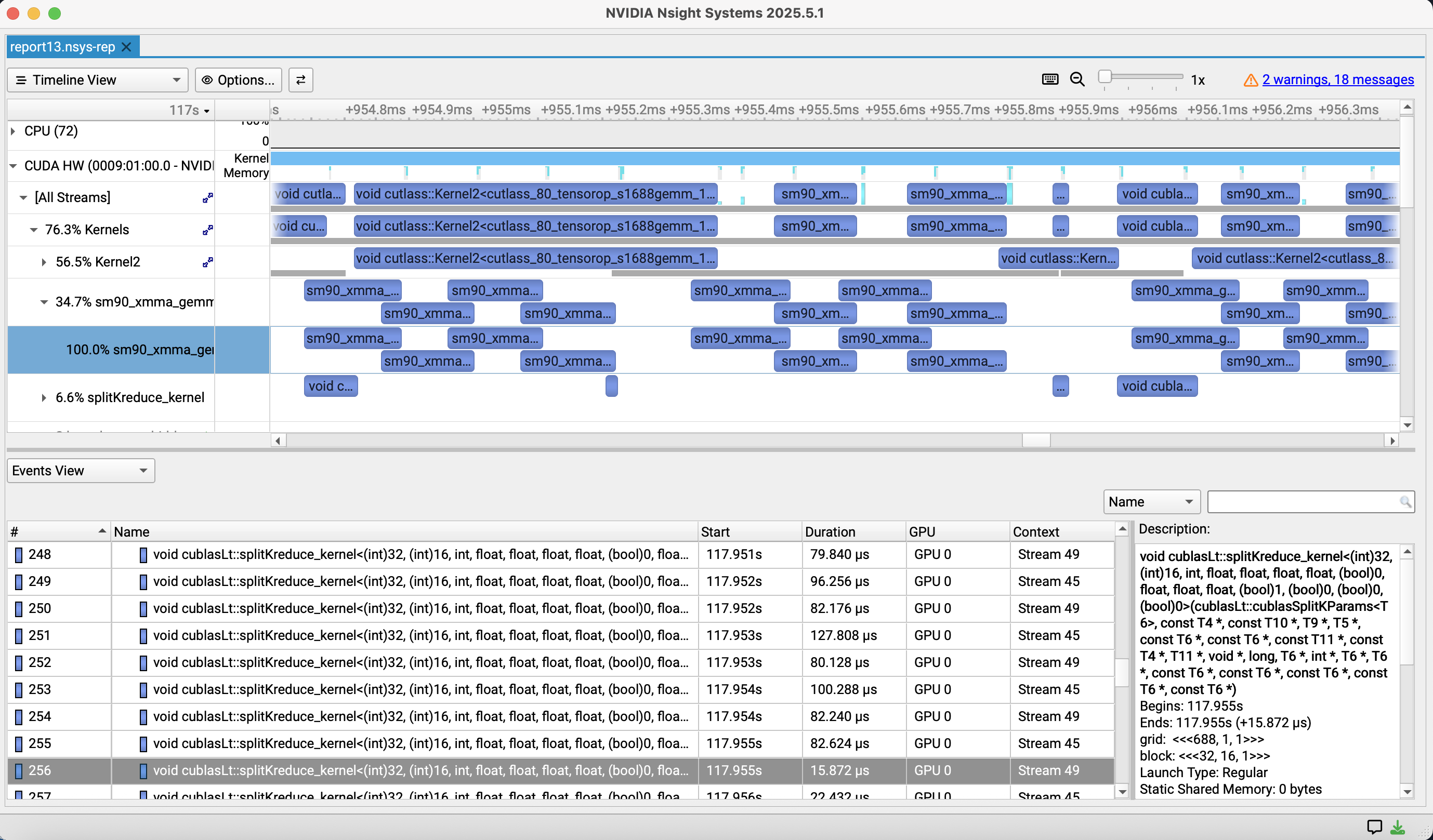
For serving engines that use CUDA Graphs, note that without --cuda-graph-trace=node the whole graph shows up as one item, and you can’t see the time of each kernel. Once you have measured times per kernel, put them next to the theoretical times in the table above and look at the measured / theoretical ratio. Kernels with a very bad ratio, and kernels that take time but aren’t in the table, are what you should optimize. If instead the whole step takes much longer than the sum of the kernel times, the problem is CPU-side scheduling or gaps between kernel launches (GPU idle time). Inference without CUDA Graphs often pays this kind of overhead.
This method takes effort, but its strength is that it tells you, kernel by kernel, where there is room to improve and how much.
Method 2: A rough estimate from “every weight is loaded at least once”
Method 1 is accurate, but listing every kernel is a lot of work when you’re just evaluating a new model or new hardware. Here a rough estimate helps: in decode, every step has to read every weight from memory at least once. The weights are far too big for the L2 cache (tens of MB), so they’re read from HBM again every step. So
\[T_{\text{step}} \ge \frac{\text{bytes of weights}}{W}\]For MoE at batch size 1, you only read the active weights. Qwen3-30B-A3B has about 3.3B active parameters, so $6.6\,\text{GB} / 4.0\,\text{TB/s} \approx 1.65\,\text{ms}$, almost the same as the 1.62 ms from Method 1, from a single line of arithmetic. As the batch size grows, different tokens pick different experts, so you read more and more experts, and the time approaches $61\,\text{GB} / 4.0\,\text{TB/s} \approx 15\,\text{ms}$ for reading all parameters (about 30.5B, 61 GB). In prefill, too, many tokens are spread across all experts, so the amount of weights read is close to this number. Prefill, however, processes many tokens at once, so its arithmetic intensity is high and it can become compute bound.
A 1T-parameter dense model is heavy
Let’s apply this estimate to a 1T-parameter dense model. In BF16, the weights alone are 2 TB.
- They don’t fit in a GH200’s HBM (96 GB) in the first place. You need at least 21 of them just to hold the weights.
- Even if one GPU could read all the weights, $2\,\text{TB} / 4.0\,\text{TB/s} = 0.5\,\text{s}$, so each token takes 0.5 seconds.
- Even if you use tensor parallelism on 21 GPUs and roughly assume the bandwidth scales 21 times, $2\,\text{TB} / 84\,\text{TB/s} \approx 24\,\text{ms}$, so the ceiling is about 40 tokens/s even ignoring communication.
FP8 only halves this, so you can tell that running a 1T-class dense model locally is pretty much out of reach, without knowing anything about the kernels.
On the other hand, an MoE model like Kimi K2 has about 1T total parameters but only about 32B active per token. A token only needs to read the active weights, so the numerator of the estimate drops to under 1/30. This is one reason MoE has become the norm for huge models, and also why expert offload, which keeps unused experts in CPU memory, works.
A real example: improving FreeToken
Finally, here’s an example where an estimate actually led to a contribution: when I improved FreeToken. FreeToken is a serving engine for running huge models on your own machine. It offloads some of an MoE model’s experts to CPU memory and keeps only the frequently used experts cached on the GPU with LRU. When a needed expert isn’t in the cache (a cache miss), its weights are transferred from CPU memory to the GPU. Depending on the interconnect bandwidth, it can also run some of the work on the CPU.
Noticing the gap between estimate and measurement
While measuring FreeToken on GH200, I took the number of cache misses during decode, multiplied it by the size of the expert weights transferred per miss (for BF16 Qwen3-30B-A3B, $3 \times 2048 \times 768 \times 2\,\text{B} \approx 9.4\,\text{MB}$ per expert), and divided by the time spent on the transfers. The effective bandwidth came out to only about 220 GB/s. GH200’s CPU-GPU link is NVLink-C2C at 450 GB/s per direction, and I had measured about 418 GB/s for a plain H2D copy with the copy engine. So the expert transfers were using only about half of the theoretical bandwidth.
GH200, ft bench bw |
GB/s |
|---|---|
| NVLink-C2C theoretical (H2D) | 450 |
| Plain H2D copy via the copy engine | 418 |
| Expert gather (nvfp4 / bf16 / mxfp4) | 222 / 202 / 212 |
Instead of stopping at “I guess CPU-GPU transfers are just like this”, putting the number next to the theoretical value made it clear there was room to improve.
Cause: not enough requests in flight
The expert transfer was done by fast_index_copy_multi, a zero-copy gather kernel. Each thread loads 16 bytes from mapped host memory, stores them, and only then issues its next load. So the amount of data in flight per bank is about
and by Little’s law the bandwidth is set by
\[\text{bandwidth} \approx \frac{\text{bytes in flight}}{\text{round-trip latency}}\]The default blocks_per_bank=8 (8192 threads per bank) had been tuned on PCIe (about 31 GB/s). PCIe has low bandwidth, so that much in flight is enough to hide the latency and saturate the link. NVLink-C2C has much higher bandwidth, so hiding the same latency needs proportionally more requests in flight at once.
The fix and the results
So I changed blocks_per_bank to 32 on hosts with NVLink-C2C (GH200 / GB200 / GB300) (PR #610). At first, detecting the device by name initialized CUDA, which broke the engine’s assumption that it owns CUDA initialization, so I switched to an environment variable. In review, I got the suggestion to detect the device after the engine has bound its GPU (inside _build_fused_copy_plan). In the end it was merged with both automatic detection and an override via the FREETOKEN_H2D_BLOCKS_PER_BANK environment variable.
| Expert gather (GH200) | blocks_per_bank=8 |
blocks_per_bank=32 |
|---|---|---|
| bf16 | 202 GB/s | 408 GB/s |
| nvfp4 | 222 GB/s | 410 GB/s |
| mxfp4 | 212 GB/s | 408 GB/s |
That brought it almost up to the copy engine’s H2D ceiling (about 418 GB/s). The change itself is only a few lines, but I only noticed “this number is slow” because I computed the effective bandwidth from the cache miss count and transfer size and put it next to the theoretical value.
Summary
- Estimation matters both for knowing what percentage of the ceiling your implementation reaches and for catching measurement mistakes.
- Adding up $\max(F_k/P, B_k/W)$ over kernels gives a precise estimate that tells you where the room for improvement is, and you can check it with Nsight Systems.
- Even the one-line estimate “every weight is loaded at least once” shows that a 1T-class dense model is too heavy, and why MoE + offload works.
- The habit of computing effective bandwidth and comparing it with the theoretical value actually led to a performance improvement in an OSS project.